|
 |
|
 |
|
| Author |
|
|||||||
|
whoop
Posts: 15144
Location: Brisbane, Queensland
|
Looking to set up RAID 0 to help with loading times of the hugeass videos my HD camcorder spits out and also for games. CA & Umart seem to mostly sell the green WD drives and MSY has sod all info on which kind of drives they sell on their site but judging by prices they're the green drives too. Is it worth looking around for the higher performance WD drives or are the green ones for normal people while the black ones are for hardcore extremists who like to use liquid nitrogen to cool their computer?
Don't the green drives run at less than 7200rpm even though they're marked as 7200rpm? All CA seem to sell are green drives & 24/7 drives although there is this which seems to be a "black" drive I think? |
|||||||
| #0 05:48am 24/12/09 |
|
|||||||
|
system
|
--
|
|||||||
| #0 |
|
|||||||
|
HerbalLizard
Posts: 3551
Location: Queenstown, New Zealand
|
How bigger a file and have you thought about using scratch disk setup instead of raid 0 with the os and s*** on it
If it was me Large SSD OS with trim reburb sas 146gb drives x 4 raid 0 ebay perc5 or sim with decent cooling or one of the supermicro uio thats going for cheap nas for archive storage Or try wd blacks which are pretty quick, also the WD1001FALS is a wd black I have 6 of them sitting on my desk last edited by HerbalLizard at 05:57:11 24/Dec/09 |
|||||||
| #1 05:57am 24/12/09 |
|
|||||||
|
whoop
Posts: 15147
Location: Brisbane, Queensland
|
I've already got a NAS for storing s*** on, I RAID'd 2 disks in my media box and by jove did it make a difference however they're too small to be of any real use and one of them is only an old 1.5gbps drive (omgwtfancient) so figured I'd just do the same in my main box. I'm not really keen on SSD drives. I might get a couple of those FALS drives, not really sure what I'll do with a couple of TB capacity but I guess I'll find something to put on it (I've currently got a 750gb drive which is probably only half full). Maybe I'll install every OS I have hehe.
Would the black drives consume more power than a normal drive or are they normal drives while the green ones are just uber power savers? last edited by whoop at 06:34:47 24/Dec/09 |
|||||||
| #2 06:34am 24/12/09 |
|
|||||||
|
HerbalLizard
Posts: 3553
Location: Queenstown, New Zealand
|
Yeap the blacks don't really do much for your power bill, but hey they are quick, just make sure they don't steal your bike
last edited by HerbalLizard at 08:13:33 24/Dec/09 |
|||||||
| #3 08:13am 24/12/09 |
|
|||||||
|
Jim
Posts: 10976
Location: Brisbane, Queensland
|
Don't the green drives run at less than 7200rpm even though they're marked as 7200rpm?they vary between 5400 and 7200 depending on what you're asking of them I've got them in my nas, and if I've not accessed the nas in a while (like an hour or something, I dunno) there's a brief pause for about 1 second if I try to browse it. after that it's business as usual you'd have to benchmark it to be sure, but I'd hazard a guess that generally speaking, they'll be as fast as non-green drives once spun up or in use |
|||||||
| #4 10:02am 24/12/09 |
|
|||||||
|
Jim
Posts: 10977
Location: Brisbane, Queensland
|
I tried to find the page on the WD site that explains the 'green' features but it seems to have been changed - I can only find marketing fud now. So don't take my word for it that they have variable rpm.
|
|||||||
| #5 10:08am 24/12/09 |
|
|||||||
|
parabol
Posts: 5594
Location: Brisbane, Queensland
|
CA & Umart seem to mostly sell the green WD drives Yeah I did a s***load of research when I went to buy, ended up giving the greens a flick. I think they would be perfectly ok for a download drive (i.e. utorrent left running 24/7) as the noise and power consumption would be low. For actual fast use I went the WD1001FALS for 1TB storage, and the blue WD5000AAKS (500GB) for my 4xRAID0+1. Both very fast, yet I still find them quiet. I don't think umart sells the blue anymore as of last week, but other retailers still do. Don't forget the usual deal with running WDTLER.exe on them in IDE mode (in BIOS) before use for RAID. For some reason some people still don't do it. Though I find on newer mainboards WDTLER only works if there is only a single drive plugged in and only in SATA Port 1 (crashes otherwise), so it takes several reboots and drive swapping to change the timeouts for all the drives one by one. last edited by parabol at 11:47:11 24/Dec/09 |
|||||||
| #6 11:47am 24/12/09 |
|
|||||||
|
HerbalLizard
Posts: 3558
Location: Queenstown, New Zealand
|
I never bother with WDTLER unless its a re3/4 drive anyway
|
|||||||
| #7 11:52am 24/12/09 |
|
|||||||
|
hardware
Posts: 6168
Location: Brisbane, Queensland
|
they vary between 5400 and 7200 depending on what you're asking of them from wikipedia: In 2007 Western Digital announced the WD GP drive touting rotational speed "between 7200 and 5400 rpm", which, if potentially misleading, is technically correct; the drive spins at 5405 rpm, and the Green Power spin speed is not variable. last edited by hardware at 11:57:27 24/Dec/09 last edited by hardware at 11:58:24 24/Dec/09 |
|||||||
| #8 11:58am 24/12/09 |
|
|||||||
|
parabol
Posts: 5596
Location: Brisbane, Queensland
|
I never bother with WDTLER unless its a re3/4 drive anyway Please elaborate, I'm not sure what you mean? |
|||||||
| #9 12:00pm 24/12/09 |
|
|||||||
|
HerbalLizard
Posts: 3559
Location: Queenstown, New Zealand
|
Wd's enterprise sata drives use a re2/3/4 prefix in the model code
wdtler (weestern digital's time-limited error recovery) is best explained here http://en.wikipedia.org/wiki/Time-Limited_Error_Recovery I always check them because I had a bad batch on a nas build |
|||||||
| #10 12:08pm 24/12/09 |
|
|||||||
|
parabol
Posts: 5597
Location: Brisbane, Queensland
|
I always check them because I had a bad batch on a nas build Oh, just for checking? I was wondering why you'd try to change the TLER setting on a drive meant to have it pre-configured from factory. I've never bought an RE drive, just regular ones, so I've always had to change the timeout. What happened with the bad batch, just kept falling out of the array? |
|||||||
| #11 12:38pm 24/12/09 |
|
|||||||
|
DM
Posts: 1265
Location: Gold Coast, Queensland
|
Attempting to read up on raid and I kinda get it but whats this about failure rates? How common are these? Also to raid drives in say 0+1 you dont need 4 of the same drives do you?
|
|||||||
| #12 03:02pm 24/12/09 |
|
|||||||
|
tequila
Posts: 4951
Location: Brisbane, Queensland
|
raid doesn't usually fail, disks fail
raid is there to stop data loss when 1 or more drives die +or to speed up disc read/writes for cached/unimportant but large data, depending how it's configured I've been saved a number of times by my raid 1 setups, you would think I'd learn but I still haven't bought a "real" backup system like tape I've been pretty lucky to never lose a raid card or on board raid controller (or the whole mobo), which if not replaced properly, can kill your whole array even though your drives are fine it's funny because I would happily spend $2000 on a TV but I would baulk at the thought of spending $2000 on a tape drive, to backup every single important file you've ever downloaded/saved/etc .. last edited by tequila at 17:02:31 24/Dec/09 |
|||||||
| #13 05:02pm 24/12/09 |
|
|||||||
|
whoop
Posts: 15148
Location: Brisbane, Queensland
|
What's this thing you're meant to run on them? I've got a couple of the green EADS 1tb drives in my NAS and no one told me I had to change anything on the drives before I could use them, should I be worried?
|
|||||||
| #14 05:12pm 24/12/09 |
|
|||||||
|
HerbalLizard
Posts: 3563
Location: Queenstown, New Zealand
|
Seriously I wouldn't be all too worried about running tler but if your drives support it then go for it. When I had the bad batch I couldn't verify the array, it was f***ing maddening problem to troubleshoot cause honesty its not something you would look for. Could build the array could write and read but then test rebuild and it went to s***.
Good thing I am anal about testing before putting s*** into production. The boss however was not happy about the tech time I threw at it but hey the client is happy. And none of the drives have caked yet so yeah. Also I am a massive fan of mdadm + lvm last edited by HerbalLizard at 18:18:59 24/Dec/09 |
|||||||
| #15 06:18pm 24/12/09 |
|
|||||||
|
whoop
Posts: 15150
Location: Brisbane, Queensland
|
A few sites say the black drives aren't all that good for RAID 0, maybe I'll just get a couple of seagate 500gb 7200.12 drives or something since I've always had pretty good luck with seagates and they're also cheaper. My current drive is one of the self bricking seagates and even so it still works fine :)
I don't know what mdadm is or does but my NAS is a readynas so I just put the drives in & turn the thing on and it works. The computer I want RAID 0 on will be windows for games & stuff. |
|||||||
| #16 06:50pm 24/12/09 |
|
|||||||
|
parabol
Posts: 5598
Location: Brisbane, Queensland
|
What's this thing you're meant to run on them? Just read the TLER link earlier in the thread. Basically the default timeout settings on non-"RE" WD drives are fine for normal setups but can cause some problems when placed in RAID. By running the WDTLER.exe tool on them once it'll change the timeout setting and you're good to go. I've done this on about 10 drives now, all in RAID now and all fine. For the RAID-edition drives that they charge double for, the setting is already configured for you. I'll just get a couple of seagate 500gb 7200.12 drives or something since I've always had pretty good luck with seagates and they're also cheaper Well the 500GB drives (WD and Seagate) are all the same price ($60-ish). Whatever you get I'd read the newegg.com reviews on the specific model before you buy, to compare user ratings as they can sometimes be useful for staying away from statistically failure-prone models. Both Seagate and WD have had bad models, so allegiance to a specific manufacturer isn't always foolproof :) I basically jump between SG and WD based on what good models are out at the time. raid doesn't usually fail, disks fail In the case of Intel v8.9 drivers, the array can fail by itself due to driver bugs. Also to raid drives in say 0+1 you dont need 4 of the same drives do you? Some people recommend different models to make sure you don't get a bad batch that all die at the same time. I just went the same drives to keep things simple. I doubt two will fail due to the same error within minutes of each other by chance ... last edited by parabol at 23:08:58 24/Dec/09 |
|||||||
| #17 11:08pm 24/12/09 |
|
|||||||
|
whoop
Posts: 15154
Location: Brisbane, Queensland
|
NOTE: the WDTLER.EXE tool is no longer available from Western Digital. WD phone support confirmed that new disks cannot have the TLER setting changed, i.e. RE disks are only suitable for RAID arrays and Caviar are only suitable for non-RAID use. WD also say that using the WDTLER.EXE tool on newer drives can damage the firmware and make the disk unusable. So sayeth that wikipedia link Well the 500GB drives (WD and Seagate) are all the same price ($60-ish). I meant cheaper than 2 WD black drives which may or may not even work well in RAID 0. I'm finding conflicting information every where I look. Some places say one drive works well while another sux, another site says the first drive is s*** while the other drive works great. Since I have 2 of the green EADS drives in my NAS and so far no problems due to that error recovery thing should I just get 2 of them for my main PC as well? They're mirrored on the NAS but I want to stripe them on the main PC. I'm starting to think with all the bulls*** involved I'll just get a single high performance drive to cut down on a) chance of failure due to some weird hard drive firmware quirk and b) make it easier to install windows since I won't need the extra drivers at boot. last edited by whoop at 23:43:18 24/Dec/09 |
|||||||
| #18 11:43pm 24/12/09 |
|
|||||||
|
tequila
Posts: 4959
Location: Brisbane, Queensland
|
I doubt two will fail due to the same error within minutes of each other by chance ... I cling to this same hope every day, however I see tape drives in my future |
|||||||
| #19 11:41pm 24/12/09 |
|
|||||||
|
HerbalLizard
Posts: 3567
Location: Queenstown, New Zealand
|
Lets hope your not waking up in the middle of the night in a cold sweat and say the words
Tape drive |
|||||||
| #20 10:02am 25/12/09 |
|
|||||||
|
parabol
Posts: 5599
Location: Brisbane, Queensland
|
So sayeth that wikipedia link As far as I know (I may be wrong) WDTLER.exe was never publicly available officially. You had to contact WD tech support and have them send you a copy, which they asked you not to distribute. I've just been using leaked copies (as have 95% of people out there), inserted into an Ultimate BootCD image and burned to disk. Yes the link says the newer models don't allow TLER changes but from what I can tell you're just after current 1TB or 500GB models, no? Should be fine. Sucks that they are disabling the feature, will have to rethink things when I create a new array in a couple of years. |
|||||||
| #21 12:33pm 25/12/09 |
|
|||||||
|
DM
Posts: 1269
Location: Gold Coast, Queensland
|
Question about raids I was thinking of last night. When you combine 2 drives to say a raid 0, does that mean that both drives combine to make 1gb or is it still only 500gb? If it's the later I may have to pick up another set. 6 drives should be enough considering right now i'm dealing with only 750gb total space.
|
|||||||
| #22 01:09pm 25/12/09 |
|
|||||||
|
whoop
Posts: 15158
Location: Brisbane, Queensland
|
RAID 0 which is stripe (I hope or I'm gonna look like a fool) combines the two to make a total size twice that of the singular drives. That's kind of why I don't really want to get the 1tb drives but that's all CA sells in the WD black, there's a couple of 500gig seagates and from what I can tell the lower gig WD drives are the old s***ty ones that everyone on every other forum I've read has said to stay away from because of the slower transfer speeds (anything below EADS firmware = avoid). I don't really need 2TB of space, I'm hard pressed to fill 750gig on this thing.
|
|||||||
| #23 01:17pm 25/12/09 |
|
|||||||
|
DM
Posts: 1270
Location: Gold Coast, Queensland
|
ok so since i'd be going for raid 0+1 that would mean with 4, 500gb drives i'd end up with 1.5tb of space? since raid 1 seems to use both drives as mirrors of each other (at least from the diagram i saw).
Trying to work out what types of drives I should get. Any good recommendations? Right now i'm just planning on getting 4, 500gb disks |
|||||||
| #24 01:43pm 25/12/09 |
|
|||||||
|
whoop
Posts: 15162
Location: Brisbane, Queensland
|
http://en.wikipedia.org/wiki/RAID
RAID 0+1: striped sets in a mirrored set (minimum four disks; even number of disks) provides fault tolerance and improved performance but increases complexity. The key difference from RAID 1+0 is that RAID 0+1 creates a second striped set to mirror a primary striped set. The array continues to operate with one or more drives failed in the same mirror set, but if drives fail on both sides of the mirror the data on the RAID system is lost. So I'd say 1TB total from the looks of it. First two would be striped so 2 x 500gb with the other 2 a mirror of the first 2. |
|||||||
| #25 01:53pm 25/12/09 |
|
|||||||
|
DM
Posts: 1271
Location: Gold Coast, Queensland
|
ok so that just made me more confused. is it worth sticking 4 drives in raid, since I read you cant partition the disks when they are in raid. That means I got 2 500gb drives. I don't really like that idea so is it worth having a single drive for the OS and then 4 others for the raid 0+1?
|
|||||||
| #26 02:05pm 25/12/09 |
|
|||||||
|
Jim
Posts: 10981
Location: Brisbane, Queensland
|
since I read you cant partition the disks when they are in raid you absolutely can |
|||||||
| #27 02:23pm 25/12/09 |
|
|||||||
|
DM
Posts: 1272
Location: Gold Coast, Queensland
|
You can? Ugh i'm so confused. I just want like 50gb for windows and the rest in 2 drives, in raid.
|
|||||||
| #28 02:29pm 25/12/09 |
|
|||||||
|
parabol
Posts: 5600
Location: Brisbane, Queensland
|
You can? Ugh i'm so confused. Here's how it works for onboard Intel RAID, installing Windows on a RAID volume. 0. You grab 4x 500GB drives, plug them in. 1. If non-RE WD model drives released before Nov 09, I'd recommend doing the WDTLER thing. Don't know about other manufacturers, I've only done RAID on WD drives. 2. In BIOS settings set your drive configuration to RAID, reboot. 3. In the Intel RAID settings (there's a menu after POST) you create a new RAID0+1 array and add all four drives to it and reboot. The system now sees a single 1TB volume, RAID hides the individual disks and does all its RAID stuff behind the scenes. 4. Prepare your Windows install by grabbing the Intel RAID drivers for installation (.inf files, etc): a) For XP you need to put the RAID drivers on floppy or slipstream them into the install CD b) For Vista you put the RAID drivers on a USB stick or floppy c) For Win7 you don't need drivers at install. Too easy. 5. Install Windows on the single 1TB volume that's visible. You can partition but I really don't see the point of doing so, you'll just end up promoting fragmentation by reducing the amount of free space on each partition. I haven't partitioned in years. 6. After Windows install you need to install the post-install component of the v8.8 Intel RAID drivers that provides the GUI and management interfaces, etc. Newer versions than v8.8 are unstable and can cause drives to pop out of RAID for no reason, but v8.8 is rock solid (not just in my opinion, but widely claimed/confirmed). 7. Done. Now you have RAID-0 speeds (roughly double a single-disk) and better-than-2disk-RAID1 redundancy (you can lose 1 drive and you're alright, you can lose a second drive also if you have a remaining mirror of that stripe - refer to RAID diagrams). Seems like a lot of effort, right? Well after you've done it once it's a piece of cake in the future. If it sounds too scary or you don't really understand RAID (0+1 in particular) then I wouldn't worry about it and just stick with a single disk. On principle I would never go RAID-0 myself in case there are driver or array issues. If a single drive falls out of the array for whatever reason (disk failure, RAID driver bugs, forgot to replug cable) and you don't follow the right steps you can say bye bye to all your data. last edited by parabol at 16:34:28 25/Dec/09 |
|||||||
| #29 04:34pm 25/12/09 |
|
|||||||
|
DM
Posts: 1273
Location: Gold Coast, Queensland
|
Thanks for the extra details. It's a good thing i'll be installing windows 7 on my pc. However I won't be really doing any of this as i'm getting umart to do it all for me. Not confident enough to try building an entire on my own so i'm sure they know what they are doing too. But it does seem rather easy to set up.
There are just 2 issues I have. 1 is if I ever need to reinstall windows. From the sounds of things everything is mostly done in bios, which will save my config so I may just need the post component, whatever that is but i'm sure that comes with the MoBo CD so all good. The 2nd is how much actual drive space I will get from the 4 disks combined. Is it only going to be 1TB? Or 1.5? All in all I wanna learn this stuff so I have to start somewhere right? Seems like a good time to get my learn on last edited by DM at 16:47:55 25/Dec/09 |
|||||||
| #30 04:47pm 25/12/09 |
|
|||||||
|
parabol
Posts: 5601
Location: Brisbane, Queensland
|
There are just 2 issues I have. 1 is if I ever need to reinstall windows. From the sounds of things everything is mostly done in bios, which will save my config so I may just need the post component, whatever that is but i'm sure that comes with the MoBo CD so all good. Not sure whether you mean drivers for your system in general or RAID drivers. For the RAID ones you need to specifically grab the version you desire off the internet (for Intel RAID anyway), fairly easy to find and heaps of instructions on the net on how to do it. The 2nd is how much actual drive space I will get from the 4 disks combined. Is it only going to be 1TB? Or 1.5? As I mentioned, for 4x500GB drives in RAID0+1 you end up with a single 1TB volume. Think of it as two drives in series for performance giving 1TB, then those two series drives are mirrored onto two other drives for redundancy. On the other hand 4 disks in RAID-0 (not recommended for a boot drive or for important data, great as a (e.g. Photoshop) scratch disk or for game data) you'd get 2TB storage, for RAID-1 you'd get 500GB storage but insane redundancy (probably more than you need in reality) If you seriously just want simple no-fuss performance for a small boot drive and you're worried about the details of RAID, maybe a single SSD or a Raptor would be an option? EDIT: Have a look at the 4-disk RAID0+1 diagram and description here: http://en.wikipedia.org/wiki/Nested_RAID_levels#RAID_0.2B1 (Ignore the 6-disk diagrams) last edited by parabol at 16:59:21 25/Dec/09 |
|||||||
| #31 04:59pm 25/12/09 |
|
|||||||
|
HerbalLizard
Posts: 3568
Location: Queenstown, New Zealand
|
Also try this raid calc tool http://www.ibeast.com/content/tools/RaidCalc/RaidCalc.asp
|
|||||||
| #32 05:04pm 25/12/09 |
|
|||||||
|
DM
Posts: 1274
Location: Gold Coast, Queensland
|
maybe a single SSD or a Raptor would be an option? SSD is a little too expensive for the budget I have left in my system. The only raptor umart has too that I see is a 300gb one for $300 which is way to much for me. I'm wondering what I keep the current raid 0+1 setup but add another 500gb disk (since they are only $60) which I can partition for boot and other stuff like movies and whatnot. Or does windows run a lot faster in raid? EDIT - that raid calc helped me understand how it all works better than what that wiki article did haha. raid 0+1 has 2 drives, all working together to store the same data, like SLI or crossfire works to make the same graphics. While the other 2 both store the same data incase of a drive failure so you can still run the raid and help out a little while accessing data. Anyway i'm just gonna go with what I have now and partition mabye 40gb off of it all to put my windows on. I REALLY hate having windows with all my normal data. last edited by DM at 17:32:50 25/Dec/09 |
|||||||
| #33 05:32pm 25/12/09 |
|
|||||||
|
simul
Posts: 666
Location: Brisbane, Queensland
|
Or does windows run a lot faster in raid? Probably won't be noticeable, and I wouldn't recommend it unless your running a decent h/w raid setup. SSD will destroy standard sata raid for general OS read speeds, so better off keeping the raid separate and when you have the cash getting an SSD for the OS. ie: |
|||||||
| #34 05:45pm 25/12/09 |
|
|||||||
|
parabol
Posts: 5602
Location: Brisbane, Queensland
|
Probably won't be noticeable It actually is. I've got two identical 1156 setups, one with RAID-1 and the other with RAID0+1 and double the ram. The latter feels much more responsive in Windows in general and apps load faster (yes I've made sure the double RAM didn't play a role in the simple tests by not running huge apps). I'm usually skeptical of people who claim "feelings" of better speed, but in this case I find a single drive or RAID-1 setup to be fairly slow these days. As mentioned the SSD will kill them in random reads, but they cost more and you have no redundancy (unless you put two in RAID-1 which will cost you buckets of $$$, or half the space if you get two half-size drives for roughly the same cost). Can't wait for prices to drop, I'd be all over them. Funny thing is as I've been putting together this i5 750 RAID0+1 system to replace my parents' dying machine, the hard-drive of the old machine died completely hours before I was about to transfer the data and complete the migration. Such bad luck and sort of reinforces my habit of going a redundancy approach. Luckily the old man did a manual backup last month, so nothing too critical was lost. |
|||||||
| #35 06:19pm 25/12/09 |
|
|||||||
|
whoop
Posts: 15165
Location: Brisbane, Queensland
|
How would an SSD go for an OS drive though? I thought they had limited read/write cycles so what would the average life expectancy of an SSD drive be? A year or two?
|
|||||||
| #36 07:51pm 25/12/09 |
|
|||||||
|
parabol
Posts: 5605
Location: Brisbane, Queensland
|
I thought they had limited read/write cycles so what would the average life expectancy of an SSD drive be? A year or two? Based on a quick search and articles written about a year ago .. Intel claims 5+ years on a few of their drives if you erase/write 100GB+ a day to them every day. I guess results will vary based on wear-leveling algorithms and TRIM-support, etc. http://techreport.com/articles.x/15433 Theoretically I'd prefer them over mechanical drives based on the simple fact of not having so many fast and close moving parts. last edited by parabol at 20:08:52 25/Dec/09 |
|||||||
| #37 08:08pm 25/12/09 |
|
|||||||
|
DM
Posts: 1275
Location: Gold Coast, Queensland
|
I'm gonna work some things around in my system so i can get my raid and a SSD 64 boot disk. its only $150 so i'm sure i'll be able to wrangle that up. cutting it razor thin to the edge of my budget though but it'll make things so much simpler.
|
|||||||
| #38 08:12pm 25/12/09 |
|
|||||||
|
Jim
Posts: 10982
Location: Brisbane, Queensland
|
64gb ocz vertex ssd
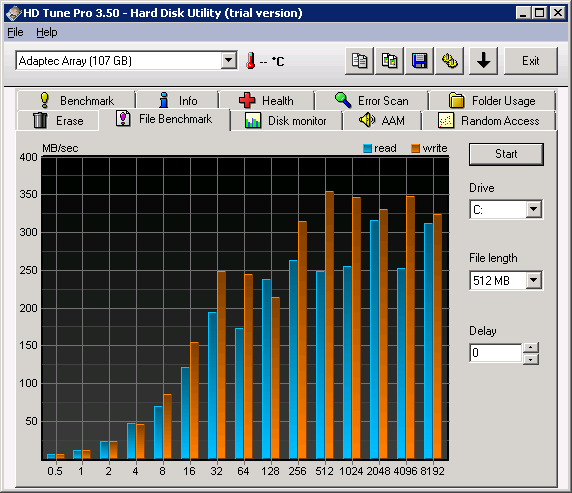
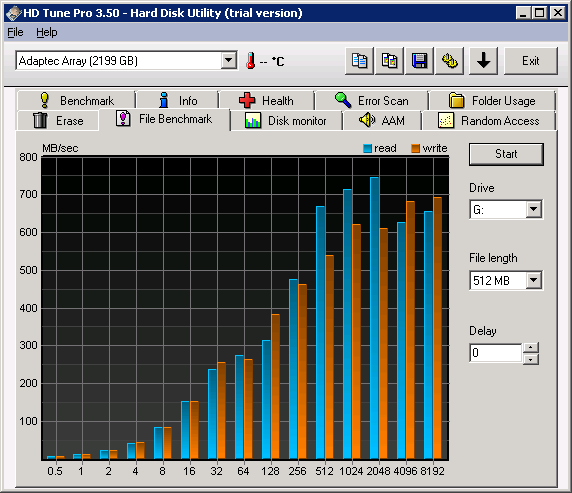
http://jason.qgl.org/images/HDTune_File_Benchmark_OCZ-VERTEX_v1.10.png 4 x 7200 rpm sata's in raid5 on an adaptec controller http://jason.qgl.org/images/HDTune_File_Benchmark_Adaptec_Array_C.png ^^ not really that expensive - controller is AUD400 and for s***s'n'giggles: 12 x 7200 rpm sata's in raid5 on an adaptec controller http://jason.qgl.org/images/HDTune_File_Benchmark_Adaptec_Array_G.png |
|||||||
| #39 11:59pm 25/12/09 |
|
|||||||
|
DM
Posts: 1276
Location: Gold Coast, Queensland
|
Do you need a controller for raid? or does that just further boost the performance of it? I ask because i've been looking at some MoBo details and they all says they support raid 0, 1, 5 and 10. No 0+1
last edited by DM at 00:21:33 26/Dec/09 |
|||||||
| #40 12:21am 26/12/09 |
|
|||||||
|
parabol
Posts: 5607
Location: Brisbane, Queensland
|
Do you need a controller for raid? or does that just further boost the performance of it? I ask because i've been looking at some MoBo details and they all says they support raid 0, 1, 5 and 10. No 0+1 Well if the mobo says it supports RAID, then it has an onboard controller. It's perfectly fine for RAID 0,1 and 10. I wouldn't use it for RAID-5 as that RAID mode requires quite a bit of number-crunching and onboard RAID can't handle that very well. If the mobo says it supports RAID "10", they are almost certainly referring to "0+1". I know Intel incorrectly states 10 when the controller actually does 0+1. Though when you have 4 drives it doesn't matter whether you have 0+1 and 1+0 (10) as the performance and redundancy is pretty much the same due to symmetry. |
|||||||
| #41 12:26am 26/12/09 |
|
|||||||
|
DM
Posts: 1277
Location: Gold Coast, Queensland
|
Also 1 more thing I just read then is that (at least according to this) i need a floppy drive or something that can be used as A:? that right?
EDIT - 1 more question then ill stop bugging the s*** out of everyone here. Do all the drives have to be the same size or can I get 2 1tb drives and another 2 500gb ones? EDIT 2 - also the more I think about it, the more I realize that I think I really don't NEED a 0+1 raid setup. in my entire life i've only ever had 1 hard drive fail and i've had PCs ever since doom has been around. Right now its coming down to the 4 500gb disks to go 0+1, or just grab 2 of the 1tb wd1001fals disks and going into raid 0. Wish I could find a benchmark on those exact type of drives to help me make up my mind. last edited by DM at 01:24:41 26/Dec/09 |
|||||||
| #42 01:24am 26/12/09 |
|
|||||||
|
parabol
Posts: 5608
Location: Brisbane, Queensland
|
If you think RAID is too much effort then don't worry about it. Just grab a fast drive, do regular backups and you'll be fine.
Anyway below is a benchmark of 1MB reads I did on 4x RAID0+1(I had a HD Tune plot too for 0.5-8192kB but forgot to save it). Took me a while to get this as Win7's superfetch and search indexing was going nuts interfering with the benchmark. On my other system it preloaded 1GB+ of my Batman Arkham Asylum files to ram because it believes I play that game at night ... http://homepage.powerup.com.au/~boldajis/images/raid01.jpg last edited by parabol at 01:49:05 26/Dec/09 |
|||||||
| #43 01:49am 26/12/09 |
|
|||||||
|
DM
Posts: 1278
Location: Gold Coast, Queensland
|
it's not that it's too much trouble. I'm just an extremely indecisive person and find it hard to make up my mind. The way I see it now is that the past 3 pc's i've had over the last 6 or 7 years have ALL only had 1 drive so if that had failed i'd of lost anything anyway so whats so different about raid 0 now.
I'll work it all out eventually so thanks for the help |
|||||||
| #44 01:54am 26/12/09 |
|
|||||||
|
simul
Posts: 667
Location: Brisbane, Queensland
|
The way I see it now is that the past 3 pc's i've had over the last 6 or 7 years have ALL only had 1 drive so if that had failed i'd of lost anything anyway so whats so different about raid 0 now. With RAID you can lose your data without the drive physically failing, but a lot of the time a rebuild will be okay. When I was running RAID0, I gave up cause it kept failing and loosing all data every few months, but having said that I was using an onboard controller (SI3112R *shudder*). |
|||||||
| #45 03:56am 26/12/09 |
|
|||||||
|
Crakaveli
Posts: 3677
Location: USA
|
Im not sure if its been mentioned yet but WD caviar blacks suck at raid performance. I bought a 1tb one and when i was researching that was one thing i was finding consistently in the reviews i was reading.
|
|||||||
| #46 11:10am 26/12/09 |
|
|||||||
|
DM
Posts: 1279
Location: Gold Coast, Queensland
|
Well after a bit more reading i've decided to ditch raid all together. i've worked my system out that I can get either a wd1001fals set of drives in raid 0+1, or I can just get a OCZ 60gb summit SSD for my boot disk (which seems to be amazing reviews) and 1 Seagate SATAII NCQ 1.5TB disk, which on at least 1 review was able to nearly beat a raptor. Works out about $40 less but i'm just not too confident in raid 0.
|
|||||||
| #47 12:17pm 26/12/09 |
|
|||||||
|
system
|
--
|
|||||||
| #47 |
|
|||||||
|
| ||||||||