|
 |
|
 |
|
| Author |
|
|||||||
|
trog
AGN Admin
Posts: 20224
Location: Brisbane, Queensland
|
DellTM 2407WFP 24" UltraSharpTM Wide Screen Flat Panel LCD Monitor
Razor Diamondback Chameleon Gaming Mouse & Sennheiser PC150 Professional headset - $1099 (which is apparently $400 off atm). I don't really care about the mouse or headphones; seems like a pretty good price for a 24" monitor...? Or am I mental. |
|||||||
| #0 06:01pm 26/03/07 |
|
|||||||
|
system
|
--
|
|||||||
| #0 |
|
|||||||
|
gimpy
Posts: 1381
Location: Brisbane, Queensland
|
haha mental, my brother calls me that
|
|||||||
| #1 06:05pm 26/03/07 |
|
|||||||
|
Boofe
Posts: 1138
Location: Brisbane, Queensland
|
I got one Trog. Must say it's very good for gamming! :) The brightness takes a little to adjust to. But other then that i can't fault it really. Plus it's good for viewing web pages in 1920 X 1200 res ;)
|
|||||||
| #2 06:11pm 26/03/07 |
|
|||||||
|
Denominator
Posts: 540
Location: Brisbane, Queensland
|
I have had one for quite a while now and it is awesom
|
|||||||
| #3 06:14pm 26/03/07 |
|
|||||||
|
Le Cock
Posts: 4107
Location: Brisbane, Queensland
|
U could try doing a spidz and ringing up dell and bartering the price down by deselecting mouse/headphones
|
|||||||
| #4 06:16pm 26/03/07 |
|
|||||||
|
Anono
Posts: 616
Location:
|
depends what u want it for?
all in one web/gaming/movies/tv etc and dont have lots of space, sure. otherwise get a $800 lcd tv and a 22" cmv for 365 od, but each to their own |
|||||||
| #5 06:16pm 26/03/07 |
|
|||||||
|
Fish
Posts: 2261
Location: Brisbane, Queensland
|
buy++;
|
|||||||
| #6 06:26pm 26/03/07 |
|
|||||||
|
Bah
Posts: 2414
Location: Brisbane, Queensland
|
They hit that price every couple of weeks.
|
|||||||
| #7 06:28pm 26/03/07 |
|
|||||||
|
Spook
Posts: 18174
Location: Brisbane, Queensland
|
yer, that seems like a lot of money for just a monitor
id probably go an LCD tele with vga in instead, unless i had a super high end gaming machine to go with it |
|||||||
| #8 06:37pm 26/03/07 |
|
|||||||
|
SCOGGEX
Posts: 697
Location: Brisbane, Queensland
|
someone clue me up here. I bought a 22inch Benq fp22 whatever from Umart the other week and it totaly fkn rocks for 430 bucks. is it s***? |
|||||||
| #9 07:10pm 26/03/07 |
|
|||||||
|
orbitor
Posts: 7234
Location: Brisbane, Queensland
|
it's a great monitor, but keep in mind you need a pretty phat system to keep framerates nice at its native resolution of 1920 x 1200.
|
|||||||
| #10 07:11pm 26/03/07 |
|
|||||||
|
Crizane Tribal
Posts: 1582
Location: Brisbane, Queensland
|
Not really, there's just a massive price jump when going from 22" to 24" based on what I've seen. If I had $1100 dollars and wanted a new monitor, I'd go a 22" and put the rest into a video card. But that's just me.
One of my flatmates has the Dell 24" monitor, it's hot stuff. Recommendations ++ |
|||||||
| #11 07:12pm 26/03/07 |
|
|||||||
|
ctd
Posts: 5119
Location: Brisbane, Queensland
|
I've had one for about a year now and I recommendation it. I prefer my 19" viewsonic for gaming, however the 24" s***s on it with everything else. Games look nicer I just cant handle the jangle playing FPS widescreen.
|
|||||||
| #12 07:15pm 26/03/07 |
|
|||||||
|
Bah
Posts: 2415
Location: Brisbane, Queensland
|
Going from a 19 inch 4:3 to a 22 inch widescreen seems pretty pointless imo as you only get a little more horizontal space, whereas the jump to 24 gets you more vertical and horizontal and a higher resolution than the 22 inch screens.
|
|||||||
| #13 07:23pm 26/03/07 |
|
|||||||
|
trog
AGN Admin
Posts: 20227
Location: Brisbane, Queensland
|
it's a great monitor, but keep in mind you need a pretty phat system to keep framerates nice at its native resolution of 1920 x 1200.Hmm, how do games work in widescreen? Do most of them just...work? |
|||||||
| #14 09:39pm 26/03/07 |
|
|||||||
|
trog
AGN Admin
Posts: 20228
Location: Brisbane, Queensland
|
Also, I just realised I can get 2x 22" monitors for less than the 1x24" :| What to do, what to do!@#
|
|||||||
| #15 09:41pm 26/03/07 |
|
|||||||
|
shad
Posts: 1783
Location: Brisbane, Queensland
|
Most games just have widescreen settings, if they dont, it will just look slightly stretched horizontally. Any modern game should work fine.
|
|||||||
| #16 09:43pm 26/03/07 |
|
|||||||
|
trog
AGN Admin
Posts: 20229
Location: Brisbane, Queensland
|
But can I run in lower resolution than 1900x1200 or will it look lame?
|
|||||||
| #17 09:51pm 26/03/07 |
|
|||||||
|
TicMan
Posts: 1779
Location: Brisbane, Queensland
|
Rich nerds at WC bought these when I was there last on a contract job.. they look superb, especially tiled 90' so you have 1200x1920 res. Makes scrolling down web pages a thing of the past.
|
|||||||
| #18 10:05pm 26/03/07 |
|
|||||||
|
shad
Posts: 1786
Location: Brisbane, Queensland
|
It tends to look lame in non native resolution.
|
|||||||
| #19 10:20pm 26/03/07 |
|
|||||||
|
Boofe
Posts: 1139
Location: Brisbane, Queensland
|
But can I run in lower resolution than 1900x1200 or will it look lame? Trog i run 800*600 for gamming as i prefer this res for my eyes. It looks fine. However i do have my desktop res set to 1920*1200. |
|||||||
| #20 10:28pm 26/03/07 |
|
|||||||
|
Alize`
Posts: 468
Location: Brisbane, Queensland
|
Trog i run 800*600 for gamming as i prefer this res for my eyes. http://img249.imageshack.us/img249/7083/5187jr2.th.jpg |
|||||||
| #21 10:32pm 26/03/07 |
|
|||||||
|
Spook
Posts: 18175
Location: Brisbane, Queensland
|
But can I run in lower resolution than 1900x1200 or will it look lame? ud look lame for wasting your money on a monitor your not using really, you are paying to display a 1900x1200 image if you dont want to display an image at that resolution, buy something that supports the resolution u want to use last edited by Spook at 08:05:49 27/Mar/07 |
|||||||
| #22 08:05am 27/03/07 |
|
|||||||
|
boba
Cainer
Posts: 2565
Location: Brisbane, Queensland
|
i've got one of these bad boys and it rocks. I do have 7900gtx sli so can run most games at 1920x1200
|
|||||||
| #23 08:59am 27/03/07 |
|
|||||||
|
TiT
Posts: 1108
Location: Brisbane, Queensland
|
Trog just bought a new computer... so if i can remember its pretty decent... all i can say is Quake Wars with 24" widescreen will be for the Win!!!!
|
|||||||
| #24 09:19am 27/03/07 |
|
|||||||
|
trog
AGN Admin
Posts: 20231
Location: Brisbane, Queensland
|
really, you are paying to display a 1900x1200 imageprolly 95% of what I use it for would be desktop apps |
|||||||
| #25 09:19am 27/03/07 |
|
|||||||
|
Denominator
Posts: 542
Location: Brisbane, Queensland
|
If you got the money go for it you can hook 2 pc's to it and have picture side by side
when you die in team game you can watch tv by using picture in picture and old dvd player without using any system resources. Games play sweet |
|||||||
| #26 09:32am 27/03/07 |
|
|||||||
|
Le Cock
Posts: 4109
Location: Brisbane, Queensland
|
Benq 22" for $415 or so at umart. Seriously how can u justify more than double that for an extra couple of inches? The screen is like 1 foot from your face - how big does it have to be?!
|
|||||||
| #27 10:04am 27/03/07 |
|
|||||||
|
TicMan
Posts: 1785
Location: Brisbane, Queensland
|
Seriously how can u justify more than double that for an extra couple of inches? That's what ya mum said.. OH NO HE DIDN'T! Oh yes he did. |
|||||||
| #28 10:07am 27/03/07 |
|
|||||||
|
trog
AGN Admin
Posts: 20232
Location: Brisbane, Queensland
|
Benq 22" for $415 or so at umart. Seriously how can u justify more than double that for an extra couple of inches? The screen is like 1 foot from your face - how big does it have to be?!For me its more about having the extra desktop real estate - but as I pointed out, if that's the case I'm prolly better off getting 2x22" and having like 3200x1050 dual display. |
|||||||
| #29 10:20am 27/03/07 |
|
|||||||
|
Eds
Posts: 8215
Location: Brisbane, Queensland
|
Its also about the quality. The dell s***s on everything, the benq, the asus, the chimei (although this is the closest), the viewsonic.
We have had them all here tried and tested and the Dell is still the nicest monitor for color and clarity and viewing angle, the Chimei coming in second. |
|||||||
| #30 11:24am 27/03/07 |
|
|||||||
|
TiT
Posts: 1110
Location: Brisbane, Queensland
|
isnt samsung really good?
|
|||||||
| #31 11:29am 27/03/07 |
|
|||||||
|
Le Cock
Posts: 4112
Location: Brisbane, Queensland
|
||||||||
| #32 11:31am 27/03/07 |
|
|||||||
|
orbitor
Posts: 7235
Location: Brisbane, Queensland
|
nah I disagree, the image quality of the DELL 24" isn't much better than the other panels - certainly not enough to justify the price difference. It just has a sexier casing and more input options.
trog: I bought the CMV/Chimei 22" panel (the 221D) for $400. 2" isn't worth $600 I reckon. In your case I would recommmend getting 2 of these for desktop work rather than one 24" panel. Much more real estate, less money. Games on LCD panels really don't look very good unless you use native resolution, and 1920x1200 does require a very quick system. The 22" panels are 1680x1050 which is still a nice high res and much less demanding on your system for games - even my 8800GTS at the 22" panel's native res can struggle in some games so I can imagine what it's like trying to run 1920x1200! PS. Keep in mind basically every 22" monitor uses the same panel (which is a Chimei one) so go for the best price/warranty/pixel conditions. For me I found that was the CMV/Chimei 221D. It's $385 at MSY now which is a bargain. |
|||||||
| #33 11:36am 27/03/07 |
|
|||||||
|
trog
AGN Admin
Posts: 20234
Location: Brisbane, Queensland
|
yeh good points; I didn't realise the difference between 24" and 22" was so great in price (been a while since I bought a monitor!)
|
|||||||
| #34 12:28pm 27/03/07 |
|
|||||||
|
Opec
Posts: 4491
Location: Brisbane, Queensland
|
I wish I have dual 22" LCD in portrait orientation. I'd make my code monkeying so much easier.... here's dreaming....
|
|||||||
| #35 12:40pm 27/03/07 |
|
|||||||
|
Crizane Tribal
Posts: 1591
Location: Brisbane, Queensland
|
Yeah I'd go 2x22" for sheezy, or just get one and pocket the savings, or put them into something else. I currently run a LG 19" and BenQ 17" together. I bought the 19" just before the market got flooded with heaps of cheap 22" monitors, but then I'm not a really big fan of widescreen : /
|
|||||||
| #36 12:42pm 27/03/07 |
|
|||||||
|
Spook
Posts: 18183
Location: Brisbane, Queensland
|
we had a heap of dell 19" monitors at work for a project i worked on (had to view lots of a4 tifs)
surprisingly, rotating the monitor is a really really good idea! edit: also, dual screen for the win especially if coding, makes a massive difference i often wonder how i ever worked without it, and thats just laptop and 19" dell particularly coz i have the laptop down low and behind stuff, so i can view pron/websites/private stuff and no one can else can see it last edited by Spook at 13:00:29 27/Mar/07 |
|||||||
| #37 01:00pm 27/03/07 |
|
|||||||
|
Crizane Tribal
Posts: 1592
Location: Brisbane, Queensland
|
Oh, Dell stands also rock the house too. Benq ones suck cock, and LG ones arent' far behind. My mate's dell stand can raise, lower, tilt, rotate, all sorts of cool s*** :(
|
|||||||
| #38 12:49pm 27/03/07 |
|
|||||||
|
parabol
Posts: 3119
Location: Brisbane, Queensland
|
I'd vote for 2x 22", as I personally find dual-screen more useful than one large screen for three reasons:
1. Being able to assign programs to different screens based on functionality (segmenting work-space) 2. Being able to see activity on a second screen while a full-screen/maximised app is running on the primary (e.g coding on one screen, reading man-page on second) 3. Being able to maximise a program to a screen with one click instead of having to fiddle with window-sizer controls to align windows. I've used that Dell 24". Pretty good screen (not so good when there's a massive dead pixel), and it has a wow factor for quite a few days. After that it's back to productivity. If you're ok with one screen that's not a problem ... if you have lots of apps open, might be better to get 2 screens (even if they are smaller). Also native resolution is a must. I don't understand why people say it's fine running it at a non-native resolution .. it looks horrible and blurry :/ last edited by parabol at 12:53:44 27/Mar/07 |
|||||||
| #39 12:53pm 27/03/07 |
|
|||||||
|
step
Posts: 1289
Location: Brisbane, Queensland
|
Get the 30"!
|
|||||||
| #40 01:13pm 27/03/07 |
|
|||||||
|
HeardY
Gaelic newb
Posts: 14473
Location: Ireland
|
I had dual screens in aus, and i LOVED that f***ing s***
I only have a single screen here and I hate that f***ing s***. From a purely 'work' point of view, I'd take dual screens over one large panel, any day, considering price etc etc if you can essentially get 2 for the price of 1, that's an easy decision (imo). However, if it was for 'home' useage, I'd go 1 large panel over 2 smaller ones.... seriously how often will you need dual screens for home useage ???? 2c |
|||||||
| #41 07:02am 28/03/07 |
|
|||||||
|
trillion
Posts: 302
Location: Brisbane, Queensland
|
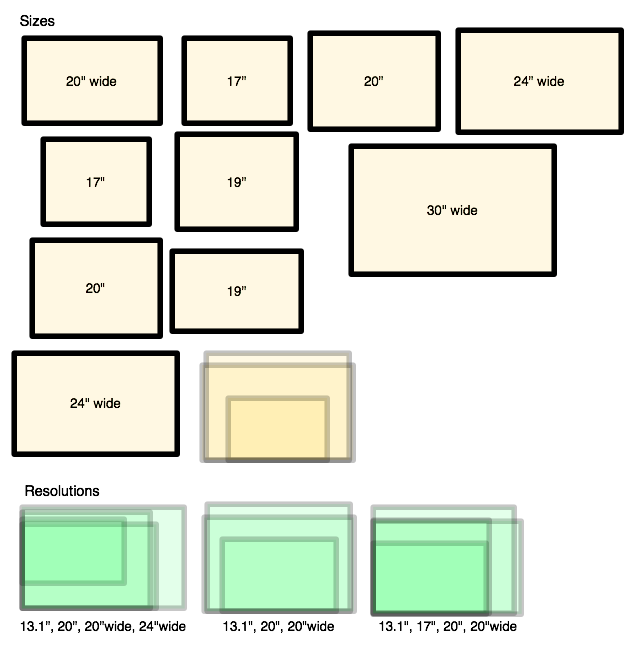
Heres an interesting size comparison chart I found when is was buying my 2 x 22"
http://matt.ucc.asn.au/displays.png |
|||||||
| #42 07:07am 28/03/07 |
|
|||||||
|
TiT
Posts: 1112
Location: Brisbane, Queensland
|
dell got special 27" for $1500
|
|||||||
| #43 08:40am 28/03/07 |
|
|||||||
|
Term
Posts: 4327
Location: Queensland
|
yeah non native is lame, and the 22's dont do 1200 last I checked?
|
|||||||
| #44 11:31am 28/03/07 |
|
|||||||
|
TicMan
Posts: 1797
Location: Brisbane, Queensland
|
Plus I think that you can only 3D accelerate one screen in a dual-screen situation.
|
|||||||
| #45 12:24pm 28/03/07 |
|
|||||||
|
Crizane Tribal
Posts: 1609
Location: Brisbane, Queensland
|
You can have a 3d game running on one screen while doing other stuff on the other. I used to have WoW on one screen while fiddling through thottbot.com on the other.
|
|||||||
| #46 02:31pm 28/03/07 |
|
|||||||
|
infi
Posts: 5370
Location: Brisbane, Queensland
|
i have experimented with dual and actually like using the WS as my secondary monitor for passive programs like msn teamspeak etc.
as for work environment i wouldn't know about that but widescreen sure is good for porn! |
|||||||
| #47 02:50pm 28/03/07 |
|
|||||||
|
Lynx
Posts: 570
Location: Brisbane, Queensland
|
I want to dual screen myself, but I have questions and queries.
Can you dual both an LCD and a CRT? Is there a big performance hit when gaming? How do you switch the mouse back and forth between the monitors? |
|||||||
| #48 03:04pm 28/03/07 |
|
|||||||
|
Triamks
Posts: 1192
Location: Brisbane, Queensland
|
I hope you haven't already bought one. If not, save a few extra dollars by using this EEP code: 39148AC40ADF. It'll give you 3% off. http://dell.communicates.to/epp/au/ for others.
Thanks to this thread I'm seriously considering buying one myself but I don't know whether I can justify spending that much on just a monitor :S |
|||||||
| #49 03:23pm 28/03/07 |
|
|||||||
|
trog
AGN Admin
Posts: 20243
Location: Brisbane, Queensland
|
Yeh I definitely have decided not to after seeing how much cheaper the 22" are.
|
|||||||
| #50 03:38pm 28/03/07 |
|
|||||||
|
demon
Posts: 2722
Location: Brisbane, Queensland
|
i gotta have dual monitors for work.. the progs i use have so many farqn control panels that with one monitor there would be no workspace. unfortunely i have to make do with teh 21" & 19" crts... work is too pov to buy me new lcds :(
lynx: yeh you can use an lcd with a crt in dual monnie mode nps. i haven't used dual monitor mode for gaming though. with the way i have it setup... as soon as the mousepointer leaves the left hand side of my main monitor it appears on the right hand side of the 2nd monitor. |
|||||||
| #51 03:47pm 28/03/07 |
|
|||||||
|
Saint
Cainer
Posts: 1825
Location: Brisbane, Queensland
|
Liar Demon, you have your second monitor for fast QGL access.
|
|||||||
| #52 04:01pm 28/03/07 |
|
|||||||
|
Lynx
Posts: 571
Location: Brisbane, Queensland
|
Demon, I was wondering how you switch screens. I figured it worked your way, just move the pointer to the other screen.
But then what if you were playing a fps, would you be accidentally moving your mouse over to the other monitor all the time? Is there a key the switches monitor focus like ([window key] + M) or something? |
|||||||
| #53 04:17pm 28/03/07 |
|
|||||||
|
Obes
Posts: 4928
Location: Brisbane, Queensland
|
Hmm, how do games work in widescreen? Do most of them just...work? A lot don't just work, more then you'd think. Most of the newer ones tend to. There is a good wiki/forum for widescreen gaming at WSGFWiki Does that dell do scaling or does it rely on the video card to do it ? From my experiences, nVidia scaling sucks works in some revisions, not others. As mentioned you'd need a very beefy machine. |
|||||||
| #54 04:23pm 28/03/07 |
|
|||||||
|
demon
Posts: 2723
Location: Brisbane, Queensland
|
saint: yes :) & teh irc!
lynx: not real sure how ya'd go if the game was setup for dual monitors... when i play q3a it fires up on the primary monitor & totally ignores the 2nd monitor (i usually turn the 2nd monitor off when launching q3a coz the gamma change makes it go all white & washed out). i recently went on a course at qut for one of the software packages i use & they had 3x19" lcds per computer... orrrjeh the clarity! :] |
|||||||
| #55 04:24pm 28/03/07 |
|
|||||||
|
Metrix
Posts: 79
Location: Brisbane, Queensland
|
I was pretty close to getting one of the 22" 1680 X 1050 floating around until I heard that the manufacture of the cheap 22" panels are rumored to being close to releasing a 30" panel. Asus, Viewsonic, CMV, Benq and pretty much every "cheap" 22" monitor uses the exact same panel.
If this is true, then one could expect a high res 2560x1600 30" LCD to possibly be sub $1000. Since i already have a 1920 X 1200 17" built into my laptop, I am in no hurry. 22" Model 30" MOdel Of course this is all speculation on my part, they could cost $10,000 for all I know :) |
|||||||
| #56 05:33pm 28/03/07 |
|
|||||||
|
Bah
Posts: 2421
Location: Brisbane, Queensland
|
http://forums.whirlpool.net.au/forum-replies.cfm?t=677699&p=20
Even cheaper this week. |
|||||||
| #57 07:22pm 30/03/07 |
|
|||||||
|
Spook
Posts: 18301
Location: Brisbane, Queensland
|
just picked up a chimei 22" for $385 from msy
very nice would have preferred it to have adjustable height, but pixture looks good certainly much better than my old 17" 3 year on site warranty 7 days dead pixture back to msy not bad for the price |
|||||||
| #58 01:58pm 14/04/07 |
|
|||||||
|
trog
AGN Admin
Posts: 20335
Location: Brisbane, Queensland
|
385 is pretty impressive indeed, sure beats boba's pov 17" that I've borrowed
|
|||||||
| #59 02:08pm 14/04/07 |
|
|||||||
|
Resonate
Posts: 271
Location: Brisbane, Queensland
|
The 2407 is rad, never regretted getting it and i use it for both computer and console gaming. love it!
|
|||||||
| #60 02:24pm 14/04/07 |
|
|||||||
|
mgguinne
Posts: 5
Location: Brisbane, Queensland
|
I have had this product for about a year now.
It is totally kick arse. All my mates just want to take it home when they come over. Also look at any reviews in say pc user and they still give it a total rap. YOU MUST BUY IT !!! |
|||||||
| #61 02:34pm 14/04/07 |
|
|||||||
|
Skitza
Posts: 7853
Location: Brisbane, Queensland
|
hehe dell
|
|||||||
| #62 02:49pm 14/04/07 |
|
|||||||
|
Le Cock
Posts: 4137
Location: Brisbane, Queensland
|
$385 for 22" is so awesome. I wonder how much cheaper they'll get...
|
|||||||
| #63 02:53pm 14/04/07 |
|
|||||||
|
trog
AGN Admin
Posts: 20336
Location: Brisbane, Queensland
|
would have preferred it to have adjustable height, but pixture looks goodhad a quick google for reviews, some say the build quality is pretty cheap, but its a good picture. Is it totally non-height adjustable? |
|||||||
| #64 02:59pm 14/04/07 |
|
|||||||
|
Spook
Posts: 18302
Location: Brisbane, Queensland
|
yup, one height fits all
fixed by use of this years whitepages, all good now all the reviews i read said the same just wondering now if its worth my while to use the dvi connection, rather than the vga didnt think about it when setting up, mite swap it over and see if noticeable quality improvement |
|||||||
| #65 03:33pm 14/04/07 |
|
|||||||
|
trog
AGN Admin
Posts: 20337
Location: Brisbane, Queensland
|
I was blown away by the difference in quality between DVI and VGA
|
|||||||
| #66 03:33pm 14/04/07 |
|
|||||||
|
Spook
Posts: 18303
Location: Brisbane, Queensland
|
up and running under dvi
ok, the plugs are in a totally retarded spot (recessed up and under the back of the monitor a fair way, theres not enough room to have vga and dvi plugged in at the same time either which is slightly annoying, and the stand is flimsy as, and i will be avoiding taking it appart or even touching it ever again it could break pretty easily and then ud be up the s***ter appart from that, its got a lot of desk top realestate probably more than my current pc can support (its gonna be upgraded for crisis anyway, so thats no drama) ill go test some games |
|||||||
| #67 03:45pm 14/04/07 |
|
|||||||
|
Spook
Posts: 18304
Location: Brisbane, Queensland
|
ok, ive discovered my pc is too s*** to game on this monitor
|
|||||||
| #68 05:31pm 14/04/07 |
|
|||||||
|
Fnukle
Posts: 4882
Location: Brisbane, Queensland
|
The 2407 is rad, never regretted getting it and i use it for both computer and console gaming. love it!Same here xbox360 at 1080i rocks my jocks :) DVI for desktop and RGB for 360 Im only running a barton 2500@3200 nf7-s2.0 6800GT 1gig ram. I run a pretty clean system (hate running processes that arnt needed) I run 1920x1200 for desktop and gaming no problems whatso ever. runs every game brilliantly even obvilion ran excellant at that res(mixed meduim/high options) lush as. halflife2 everything maxed out to the max smooth as no worries at all. only the one monitor tho. with todays hardware you'd be laughing |
|||||||
| #69 12:33pm 15/04/07 |
|
|||||||
|
orbitor
Posts: 7253
Location: Brisbane, Queensland
|
spook you did pull off the backplate on the monitor right? makes putting the plugs in a piece of piss.
None of the cheap monitors come with fancy height-adjustable-ness or swivelling unfortunately. But I figure once you get it in the right position, you aren't gonna move it again anyway. |
|||||||
| #70 12:55pm 15/04/07 |
|
|||||||
|
dRanged
Posts: 900
Location: Sydney, New South Wales
|
so, which 22" lcds are rotateable to portrait mode? All I've seen sofar is just landscape.. I thought at least the Samsungs would let you, but it seems not.. :(
|
|||||||
| #71 04:04pm 22/04/07 |
|
|||||||
|
Alt_F4
Posts: 188
Location: Brisbane, Queensland
|
Yeah, but yeah it looks really s***. Like i used to use a 17" LCD and 17" CRT, 1st they were different frequencies which sucks, and also the CRT only had like 16" of screen real estate further making it look s***. I got a benq fp222w 22" a while ago for $400 odd, really happy with it, though i dont use it for games at all |
|||||||
| #72 04:34pm 22/04/07 |
|
|||||||
|
gimpy
Posts: 1451
Location: Brisbane, Queensland
|
Tempted to buy either one of these or the BenQ 22inch but my laptop doesn't have DVI out..
Is there add-ons you can buy for laptops to get DVI out? I've searched google/ebay/dell can't find anything. Laptop model is Dell 6400. Some Dell docking stations had DVI out, but the only one I could find for the 6400 wasn't made by Dell and didn't include a DVI port. |
|||||||
| #73 06:31pm 22/04/07 |
|
|||||||
|
Spook
Posts: 18358
Location: Brisbane, Queensland
|
using vga isnt that much of an image quality hit
just use vga |
|||||||
| #74 06:37pm 22/04/07 |
|
|||||||
|
dRanged
Posts: 902
Location: Sydney, New South Wales
|
ok so there is squat in 22" which is portraitable.. There are a couple of exceptions but they are basically twice the price of the going rate. Maybe a VESA stand might be the cheap & nasty way out.
|
|||||||
| #75 07:13pm 22/04/07 |
|
|||||||
|
gimpy
Posts: 1452
Location: Brisbane, Queensland
|
are u sure spook? i dun wanna be handing out my hard earned cash and get it home and be watching some inferior image quality porn if you know what im sayings
|
|||||||
| #76 11:26pm 22/04/07 |
|
|||||||
|
Spook
Posts: 18366
Location: Brisbane, Queensland
|
i wouldnt lie to you gimpy
monitors are pretty good at converting the analogue signal to digital as well last edited by Spook at 07:33:35 23/Apr/07 |
|||||||
| #77 07:33am 23/04/07 |
|
|||||||
|
blahnana
Posts: 230
Location: Brisbane, Queensland
|
Movies you won't notice the difference. If you look at text on your monitor all the time you'll definitely notice the difference bewteeen DVI and Analogue.
|
|||||||
| #78 08:46am 23/04/07 |
|
|||||||
|
gimpy
Posts: 1456
Location: Brisbane, Queensland
|
Oh sweet, yeah will only be using the bigger screen for movies and hopefully games
Currently my native rez is 1280x800, but, if I get the 22inch it's native is going to be 1680x1050 Is it possible to test the FPS of my current video card at 1680x1050 without having a monitor of that rez plugged in? |
|||||||
| #79 01:23pm 23/04/07 |
|
|||||||
|
stinky
Posts: 1919
Location: Brisbane, Queensland
|
same here xbox360 at 1080i rocks my jocks :) How well does it deal with displaying a 16:9 image on a 16:10 monitor? Does the Dell blackborder it, or stretch the image ? |
|||||||
| #80 03:49pm 23/04/07 |
|
|||||||
|
system
|
--
|
|||||||
| #80 |
|
|||||||
|
| ||||||||