|
 |
|
 |
|
| Author |
|
|||||||
|
Tiny
Posts: 1127
Location: Brisbane, Queensland
|
I am having trouble downloading torrents.
Basically it all started when i reinstalled my OS from xp home to xp pro. I do not think this is the problem. Using azereus i expereince constant port problems. Or at least Azereus informs me with its error pop up message, saying the port is blocked - check your router and firewall. The strangest thing is it randomly opens up again and the download resumes for a while before it drops out about half an hour later. I run a wireless shared net connection through a netgear wgr614 wireless router. I even tried port forwarding - although i am not sure i pulled it off correctly , i am a little hazy with it. It was working fine before i reinstalled my OS. I have no firewalls on, only anti virus. Any ideas how to fix this? ( it does not matter which port i choose in azereus, i get the same issue). |
|||||||
| #0 12:39am 20/03/07 |
|
|||||||
|
system
|
--
|
|||||||
| #0 |
|
|||||||
|
whoop
Posts: 11067
Location: Brisbane, Queensland
|
you realise windows xp sp2 has a built in firewall right? also check that upnp is on, forwarding the correct ports. If not, forward them manually.
edit: also doesn't assureus change the default port every time you install it? I forget, it's been ages since I used any bittorrent program last edited by whoop at 01:04:15 20/Mar/07 |
|||||||
| #1 01:04am 20/03/07 |
|
|||||||
|
Insom
Posts: 1325
Location: Brisbane, Queensland
|
At a glance that router doesn't have uPNP, but it well might.
Does restarting the router have any effect on the messages? For instance I have experienced weird NAT issues with a couple of Netgear router/modems after they have been running for awhile. P2P tends to go through ports quickly and the router/modem appeared not to be releasing used NAT ports for re-use quickly enough. So existing connections continued fine (easiest way to tell was IRC which continued uninterrupted) but it became impossible to make any new ones. But this issue would be affecting your other Internet apps as well - Web sites would not load and so on. In any case firmware patches mostly fixed it, or getting the P2P program not to open so many goddamn connections. Also Netgear has this dopey DOS protection, turn that s*** off. |
|||||||
| #2 12:55am 20/03/07 |
|
|||||||
|
reso
I can't read
Posts: 3975
Location: Brisbane, Queensland
|
Try uTorrent with the 'Automatically add XP Firewall rules' checked.
|
|||||||
| #3 12:57am 20/03/07 |
|
|||||||
|
Creepy
Posts: 627
Location: USA
|
Have you applied LvL Lord's TCPIP.SYS hack yet?
|
|||||||
| #4 02:15am 20/03/07 |
|
|||||||
|
Tiny
Posts: 1128
Location: Brisbane, Queensland
|
its a WGR614 v 5. It has upnp. It is enabled and i even went as far as to add the port manually into the allow list.
I have the windows firewall turned off. Turning this off disables all the windows firewalls right? Insom i couldn't find any setting for that DOS protection in my router settings. Furthermore the NAT/Firewall test in azereus tells me the port is ok. But it cannot be because i am not getting any transfer at all. I also have not exceeded my monthly limit so i am not cappped. And with the massive list of seeds and peers i get it has to be something on my end stopping it. |
|||||||
| #5 03:27am 20/03/07 |
|
|||||||
|
Creepy
Posts: 628
Location: USA
|
www.portforward.com for tips specific to your router
If you haven't, consider applying the patch here...or at least read up on what happened with BT and Windows XP SP2: http://www.lvllord.de/ Also, I recommend not using UPnP. It's only useful for places where you don't have control over the firewall. If you are the admin, you can set up your own policies which work more efficiently. :) |
|||||||
| #6 06:57am 20/03/07 |
|
|||||||
|
Spook
Posts: 18113
Location: Brisbane, Queensland
|
first of all, get rid of azerus, its junk
install utorrent turn off upnp u can leave windows firewall on, check the rule for it in utorrent (make exception) get some skills and learn to port forward set your ip to be static and setup your port forward rule to that static ip profit |
|||||||
| #7 07:01am 20/03/07 |
|
|||||||
|
HeardY
Gaelic newb
Posts: 14439
Location: Ireland
|
spook laying the smaq
|
|||||||
| #8 07:42am 20/03/07 |
|
|||||||
|
Two&Eight
Posts: 172
Location: UK
|
I'm having the exact same problem, and I've narrowed it down to my inability to forward ports. The link above is excellent, and am at least partially sure that anyone with some motivation could self teach themselves. I don't give enough of a s***, so no warez for me.
|
|||||||
| #9 08:12am 20/03/07 |
|
|||||||
|
Crizane Tribal
Posts: 1552
Location: Brisbane, Queensland
|
uTorrent and Bitlord FTW!
|
|||||||
| #10 09:06am 20/03/07 |
|
|||||||
|
TicMan
Posts: 1731
Location: Brisbane, Queensland
|
Also, change the default port that your using - it's becoming common practice for ISPs to block those ports to stop the juarez.
|
|||||||
| #11 10:16am 20/03/07 |
|
|||||||
|
Tiny
Posts: 1129
Location: Brisbane, Queensland
|
I switched to utorrent. It fixed the problem. I took spooks advice and enabled windows firewall, Utorrent still works. Thanks for the help.
|
|||||||
| #12 01:06pm 20/03/07 |
|
|||||||
|
parabol
Posts: 3097
Location: Brisbane, Queensland
|
Congratulations on the fix. utorrent usually "just works" (or user error is to blame).
Also, 12 posts in and not a single correct spelling of Azureus. I'd like to hear you guys pronounce it :) |
|||||||
| #13 01:10pm 20/03/07 |
|
|||||||
|
Jim
Posts: 5522
Location: Brisbane, Queensland
|
I like azureus, works like a champ in windows and linux, never have a problem with it
|
|||||||
| #14 01:19pm 20/03/07 |
|
|||||||
|
Spook
Posts: 18116
Location: Brisbane, Queensland
|
i see you like your software like your vehicles
bloated and resource wasting you stinx at torrenting jim, sorry last edited by Spook at 13:30:18 20/Mar/07 |
|||||||
| #15 01:30pm 20/03/07 |
|
|||||||
|
Psycho!
Posts: 5914
Location: Brisbane, Queensland
|
I know I am a dumb f***er and I have done all that the utorrent support site indicates, I have set the static IP and stuff that Spook said but when I start to d/load something it is going soooo slow its estimating DAYS for s*** to get here?? WTF..I thought this torrent thaing was fast?
any hep appreciated.. :( |
|||||||
| #16 08:02pm 20/03/07 |
|
|||||||
|
parabol
Posts: 3099
Location: Brisbane, Queensland
|
WTF..I thought this torrent thaing was fast? 1. Where are you downloading from? 2. How many seeders are there on that torrent? 3. If you do "Options->SpeedGuide->TestIfPortIsForwardedProperly", does it pass the test? 4. Did you cap your upload speed to less than 6kB/s inside utorrent? (Important!) If the above questions have ok answers, then I'll again paste some magic values from experience: In Options->Preferences->BitTorrent: 1. Set the global number of connections to 300. 2. Set the number of connected peers per torrent to 250. 3. Set number of upload slots per torrent to 6. 4. Click on the Scheduler menu, make sure the scheduler is off. 5. Click on the Connection menu, make sure your Max upload and download rates are both set to 0. Report back. |
|||||||
| #17 08:16pm 20/03/07 |
|
|||||||
|
Spook
Posts: 18123
Location: Brisbane, Queensland
|
if its not the fastest dling experience on the net, you arent doing it right
i regularly see 800kb/s+ on my private tracker site |
|||||||
| #18 08:39pm 20/03/07 |
|
|||||||
|
Jim
Posts: 5525
Location: Brisbane, Queensland
|
azureus rocks
|
|||||||
| #19 09:52pm 20/03/07 |
|
|||||||
|
TicMan
Posts: 1739
Location: Brisbane, Queensland
|
I'm with Jim - headless azureus Linux client is the cheese.
Also I heard that you shouldn't set your max upload to 0 or infinity because it'll just flood your outbound and virtually stop your downstream, something to do with that A in ADSL. |
|||||||
| #20 10:27pm 20/03/07 |
|
|||||||
|
koopz
Posts: 6129
Location: Queensland
|
first of all, get rid of azerus, its junk quoted for truth azureus rocks on a dedicated box that doesn't haveto do anything other than dl linux isos - yeah is sure works well there. run it on your gameing puter/workstation/server and it's poo. much hate towards people who host |
|||||||
| #21 12:39am 21/03/07 |
|
|||||||
|
Creepy
Posts: 632
Location: USA
|
Isn't Azureus now "dead" and reborn as some new media thingo? Or was that just the Mac OS port..?
|
|||||||
| #22 02:20am 21/03/07 |
|
|||||||
|
Jim
Posts: 5527
Location: Brisbane, Queensland
|
nah it rocks on my gaming/workstation computer
|
|||||||
| #23 07:26am 21/03/07 |
|
|||||||
|
Creepy
Posts: 634
Location: USA
|
||||||||
| #24 08:41am 21/03/07 |
|
|||||||
|
Tael
Posts: 2743
Location: Brisbane, Queensland
|
Also I heard that you shouldn't set your max upload to 0 or infinity because it'll just flood your outbound and virtually stop your downstream, something to do with that A in ADSL.You shouldn't set your upload speed to your maximum upload bandwidth on ANY connection. This is because you need upload bandwidth to send requests for what you want to download. |
|||||||
| #25 11:55am 21/03/07 |
|
|||||||
|
parabol
Posts: 3101
Location: Brisbane, Queensland
|
Also I heard that you shouldn't set your max upload to 0 or infinity because it'll just flood your outbound It's perfectly fine if you're in the trouble-shooting phase, as you're troubleshooting because your speeds are crap and you haven't received much data, hence you don't have much to send to others and can't really max out your upstream. Once you have your other settings correct and solved your download speed problem, you should then set your torrent upload speed to about 75% of your maximum upload speed. Usually for single-stream upload traffic like FTP, you could go up to 90% since it's predictable one-connection-only traffic, but with BitTorrent .. every new connection the client makes to a peer will max out your upstream momentarily before the BitTorrent client and/or TCP can successfully throttle it, hence the more conservative ~75% value. This is because you need upload bandwidth to send requests for what you want to download. Not to mention sending TCP ACKs. |
|||||||
| #26 12:52pm 21/03/07 |
|
|||||||
|
Jim
Posts: 5536
Location: Brisbane, Queensland
|
||||||||
| #27 10:45pm 21/03/07 |
|
|||||||
|
icewyrm
Posts: 1751
Location: Brisbane, Queensland
|
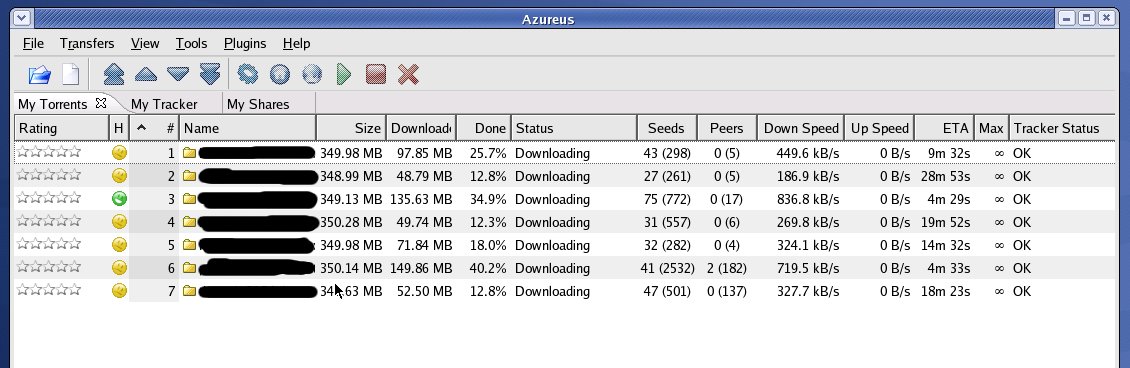
downloading some heroes thar jim?
|
|||||||
| #28 10:51pm 21/03/07 |
|
|||||||
|
Alize`
Posts: 462
Location: Brisbane, Queensland
|
Jim I'm jealous :(
|
|||||||
| #29 10:55pm 21/03/07 |
|
|||||||
|
Jim
Posts: 5537
Location: Brisbane, Queensland
|
linux distros
I blank them out so as to not show favour toward any one distro |
|||||||
| #30 10:58pm 21/03/07 |
|
|||||||
|
icewyrm
Posts: 1752
Location: Brisbane, Queensland
|
nice sharing btw
|
|||||||
| #31 11:08pm 21/03/07 |
|
|||||||
|
parabol
Posts: 3103
Location: Brisbane, Queensland
|
linux distros Ah yes, the good ol' 350MB USB-stick distros. |
|||||||
| #32 11:32pm 21/03/07 |
|
|||||||
|
Creepy
Posts: 636
Location: USA
|
No upload speeds! You dirty leecher Jim!!
|
|||||||
| #33 04:23am 22/03/07 |
|
|||||||
|
Spook
Posts: 18138
Location: Brisbane, Queensland
|
sif not giving back to the community
jims a taker |
|||||||
| #34 07:02am 22/03/07 |
|
|||||||
|
Jim
Posts: 5538
Location: Brisbane, Queensland
|
not everyone shares my love of linux distros
you can lead a horse to water but you can't make him drink |
|||||||
| #35 07:29am 22/03/07 |
|
|||||||
|
system
|
--
|
|||||||
| #35 |
|
|||||||
|
| ||||||||