|
 |
|
 |
|
| Author |
|
|||||||
|
mongie
Posts: 5852
Location: Brisbane, Queensland
|
Has anyone tried Windows 7 yet?
I've just installed it on my main pc and it seems awesome. Very quick, and with even better usability than Vista. They might be on to a winner here. UI is pretty interesting so far, the taskbar has changed a fair bit, with names in the taskbar disabled by default and the quicklaunch bar, task bar and system tray merging into one semi quicklaunch-task-systemtray bar. ATI have pre-release drivers our, but I've yet to try and play a game. I'd already read that gaming performance so far is better than XP and Vista. The public beta started this weekend, so if you want to try it, I suggest you get in now. Windows7.com PS: Windows 7 is due out in Q1 2010. Release date will be dependent on the quality of the software (as per usual). |
|||||||
| #0 10:55pm 11/01/09 |
|
|||||||
|
system
|
--
|
|||||||
| #0 |
|
|||||||
|
Alt_F4
Posts: 660
Location: Brisbane, Queensland
|
Direct links (approx 3.15GB download):
32-bit http://download.microsoft.com/download/6/3/3/633118BD-6C3D-45A4-B985-F0FDFFE1B021/EN/7000.0.081212-1400_client_en-us_Ultimate-GB1CULFRE_EN_DVD.iso 64-bit http://download.microsoft.com/download/6/3/3/633118BD-6C3D-45A4-B985-F0FDFFE1B021/EN/7000.0.081212-1400_client_en-us_Ultimate-GB1CULXFRE_EN_DVD.ISO Haven't tried it myself yet due to my meager 25GB bigpond allowance. IIRC Microsoft doesn't allow people to mirror their files, so i'll have to wait till the end of my billing month before i can pick it up. |
|||||||
| #1 11:02pm 11/01/09 |
|
|||||||
|
mongie
Posts: 5853
Location: Brisbane, Queensland
|
Also note that you need to get a key, otherwise its limited to the 30-day activation period.
The beta (with key) goes through to August. |
|||||||
| #2 11:05pm 11/01/09 |
|
|||||||
|
Alt_F4
Posts: 661
Location: Brisbane, Queensland
|
With the keys, it seems for the most part they are just giving out only 5 different keys. Some creative googling may be able to find you a list of them.
|
|||||||
| #3 11:09pm 11/01/09 |
|
|||||||
|
whoop
Posts: 13361
Location: Brisbane, Queensland
|
I just downloaded this and am attempting to install it in a VM.
|
|||||||
| #4 11:12pm 11/01/09 |
|
|||||||
|
koopz
Posts: 7368
Location: Brisbane, Queensland
|
They might be on to a winner here. lets hope so consumers already wonder why they need to buy anything other than XP. so do I :/ |
|||||||
| #5 11:28pm 11/01/09 |
|
|||||||
|
Alt_F4
Posts: 662
Location: Brisbane, Queensland
|
Yeah, it's pretty damn dirty how people agree to go out of their way to make software only work for Vista. |
|||||||
| #6 11:33pm 11/01/09 |
|
|||||||
|
phathead
Posts: 1877
Location: Brisbane, Queensland
|
I'm just trying this out now.
i am running boot camp under osx on my macbook pro - and first time i have tested. seems to be going awesomely so far. only thing wrong is i dont have audio drivers. but downloading the latest realtek ones which should fix the problem - however its from realteks slow website going at 10k/s ... but yeah everything is so quick compared to xp / vista. |
|||||||
| #7 11:34pm 11/01/09 |
|
|||||||
|
Midda
Posts: 2990
Location: Brisbane, Queensland
|
Yep, I'm running it on my PC. I've actually taken off Vista and just running Windows 7 as my only OS now. I figure that's the best way to really give it a thorough testing. I've backed up all of my important data, of course, but so far I'm very impressed. I love the new taskbar, and everything is noticeably faster. Even game performance has improved slightly.
|
|||||||
| #8 11:35pm 11/01/09 |
|
|||||||
|
LoneWolf
Posts: 396
Location: Brisbane, Queensland
|
Does it work with older hardware? Vista doesn't play the game on my machine due to no sound drivers (GTXP) and no onboard NiC drivers. If Vista doesn't work properly on this PC, what's the chances Windows 7 will?
|
|||||||
| #9 11:41pm 11/01/09 |
|
|||||||
|
Midda
Posts: 2993
Location: Brisbane, Queensland
|
I think Windows 7 uses the same drivers as Vista.
|
|||||||
| #10 11:42pm 11/01/09 |
|
|||||||
|
whoop
Posts: 13363
Location: Brisbane, Queensland
|
I love the new taskbar, and everything is noticeably faster. Even game performance has improved slightly. I hate the new task bar, I want my old one back, start button, quick launch menu and systray are all you need :( For some reason it's decided it doesn't even watn to boot inside this VM (seen others on the internet use it inside virtualbox) after installing the network card. |
|||||||
| #11 11:49pm 11/01/09 |
|
|||||||
|
Reverend
Posts: 1222
Location: Gold Coast, Queensland
|
Err forgive me for being ignorant but if its not Xp and not vista what drivers do you use ???or does it havea good driver base unlike vista.
Already answered dam u n*****s are quick last edited by Reverend at 23:55:01 11/Jan/09 |
|||||||
| #12 11:55pm 11/01/09 |
|
|||||||
|
phathead
Posts: 1878
Location: Brisbane, Queensland
|
p.s. i never used much of vista and i don't know if there was / is a showdesktop icon.
but with windows 7 the show desktop is in the bottom right of start menu near clock. i was wondering where else to get to desktop apart from winkey+d or alt-tabbing to it. |
|||||||
| #13 11:58pm 11/01/09 |
|
|||||||
|
Alt_F4
Posts: 664
Location: Brisbane, Queensland
|
Do you need anything else to get there apart from winkey+D though?
|
|||||||
| #14 12:00am 12/01/09 |
|
|||||||
|
phathead
Posts: 1879
Location: Brisbane, Queensland
|
yeah thats true.. but i find myself doing a mixture of clicking the show desktop & win d. must just be a habit i have but yeah oh well.
|
|||||||
| #15 12:14am 12/01/09 |
|
|||||||
|
whoop
Posts: 13364
Location: Brisbane, Queensland
|
Posting from windows 7, I like how the windows sidebar gadgets don't actually need the sidebar, they just seem to go straight on the desktop. Not really a fan of the new taskbar/systray area thing but I suspect once I get used to it it'll be ok.
p.s. i never used much of vista and i don't know if there was / is a showdesktop icon. The show desktop icon has been there since what, windows 95 with ie4? or was it windows 98? Either way, vista had one. |
|||||||
| #16 12:26am 12/01/09 |
|
|||||||
|
mongie
Posts: 5854
Location: Brisbane, Queensland
|
Theres also a shake function
if you grab the top of a window and shake it from side to side, it will hide all of the other windows. |
|||||||
| #17 09:24am 12/01/09 |
|
|||||||
|
mooby
Posts: 4461
Location: Brisbane, Queensland
|
can you dual boot?
|
|||||||
| #18 09:36am 12/01/09 |
|
|||||||
|
boba
Cainer
Posts: 3252
Location: Brisbane, Queensland
|
was running this all yesterday playing l4d and had no probs with it at all. very snappy compared to vista
|
|||||||
| #19 09:46am 12/01/09 |
|
|||||||
|
Raven
Posts: 3241
Location: Melbourne, Victoria
|
I'm thinking of going back to a desktop because there's too many things I want to do that I can't under Mac OSX, might give this a go instead since nothing seems to run on XP64 either.
|
|||||||
| #20 09:57am 12/01/09 |
|
|||||||
|
dRanged
Posts: 1309
Location: USA
|
Like what? fink & macports should be enough? vmware / dual boot. no worries.
|
|||||||
| #21 11:42am 12/01/09 |
|
|||||||
|
boba
Cainer
Posts: 3253
Location: Brisbane, Queensland
|
if you want to get chrome working in windows 7 try the following
right click on your chrome icon then select properties. Under the shortcut tab you will see Target. The line ends with chrome.exe so just add --in-process-plugins after that. So the line should look something like this: |
|||||||
| #22 11:54am 12/01/09 |
|
|||||||
|
mongie
Posts: 5855
Location: Brisbane, Queensland
|
Also note... you can change the way the taskbar behaves (back to old style) by right clicking on it, and going to properties. You can disable the grouping, or set it to group only when the taskbar is full.
|
|||||||
| #23 11:59am 12/01/09 |
|
|||||||
|
Midda
Posts: 2995
Location: Brisbane, Queensland
|
if you want to get chrome working in windows 7 try the following Chrome works for me anyway. What's it not doing on your machine? |
|||||||
| #24 01:08pm 12/01/09 |
|
|||||||
|
simul
Posts: 356
Location: Brisbane, Queensland
|
How long did it take before anything popped up on the first screen of the installer? For me it just sits there, mouse is still movable, but nothing pops up. f***ing windows.
|
|||||||
| #25 01:11pm 12/01/09 |
|
|||||||
|
Midda
Posts: 2996
Location: Brisbane, Queensland
|
You mean when you boot from the Windows 7 disc? It was as quick as any other Windows installer for me. I did have to re-burn the image for the x64 version though, but I'm not sure why. It would just say that a file was corrupt at 0% installation progress. I re-burned the disc at 1x speed and then it was fine.
|
|||||||
| #26 01:14pm 12/01/09 |
|
|||||||
|
Reverend
Posts: 1223
Location: Gold Coast, Queensland
|
When you mount the image then copy the contents to disk do you have to make the disk bootable or is it in the ISO setup after u burn it??
PS i am not a tech i am a truck driver sorry if the questions a bit silly last edited by Reverend at 13:27:24 12/Jan/09 |
|||||||
| #27 01:27pm 12/01/09 |
|
|||||||
|
Alt_F4
Posts: 668
Location: Brisbane, Queensland
|
Err just burn the ISO to a disc... then restart your comp and set it to boot from disc?
|
|||||||
| #28 01:32pm 12/01/09 |
|
|||||||
|
casa
Thimes
Posts: 3141
Location: Brisbane, Queensland
|
f***en hell rev you stupid noob, get off the forums if you dont know what is going on!! (ps: Hi!!) :) |
|||||||
| #29 01:39pm 12/01/09 |
|
|||||||
|
MrHardware
Posts: 4192
Location: Brisbane, Queensland
|
installing 32-bit now as a virtual machine
|
|||||||
| #30 01:48pm 12/01/09 |
|
|||||||
|
Reverend
Posts: 1224
Location: Gold Coast, Queensland
|
hahahahah casa you have found me out mate LOLOL + Hi + Hi t u too . |
|||||||
| #31 01:50pm 12/01/09 |
|
|||||||
|
mongie
Posts: 5856
Location: Brisbane, Queensland
|
ps: Rev - rather than placing the iso on a disc, you burn the iso "to a disc" and it should boot from it.
Nero has this option. |
|||||||
| #32 02:29pm 12/01/09 |
|
|||||||
|
$ack
Posts: 346
Location: Brisbane, Queensland
|
Installing on VMWare with TechNet key.
Sounds good from what I'm hearing so far. |
|||||||
| #33 02:36pm 12/01/09 |
|
|||||||
|
simul
Posts: 357
Location: Brisbane, Queensland
|
How long did it take before anything popped up on the first screen of the installer? For me it just sits there, mouse is still movable, but nothing pops up. f***ing windows. Went for lunch, came back and it had moved. Installed now. Seems nice, Task bar is going application centric rather than window centric (at long f***ing last!!!!#@!#@!). The taskbar still needs some work in terms of look and feel. Overall it looks very nice, seems to run well (no games installed yet), the only real issue I have with it at the moment is that the Libraries icon looks like its irrigated. Fading background actually works well for once, the sidebar is no longer like a deer sitting in the middle of the road. Also I have it dual booted, but it doesn't seem to pick up the XP partition inside W7, I can still boot into XP, so its all there, its just not shown in W7. Update: For some reason u need to remap the XP drive through administrative tools, not sure if this breaks the XP install. |
|||||||
| #34 02:38pm 12/01/09 |
|
|||||||
|
Reverend
Posts: 1225
Location: Gold Coast, Queensland
|
yer its up and running seems pretty good but my stupid virus scanner isnt compatable DAMMIT |
|||||||
| #35 02:45pm 12/01/09 |
|
|||||||
|
MrHardware
Posts: 4193
Location: Brisbane, Queensland
|
Installing on VMWare with TechNet key.Ditto. Installed, looks good. Perhaps very vista-ish? In fact, having played with Win7 for an hour is probably the same amount of time i've spent on vista, and i'd be hard pressed to tell them apart. |
|||||||
| #36 02:49pm 12/01/09 |
|
|||||||
|
euphoria
Posts: 968
Location: Gold Coast, Queensland
|
I tried to install in VM with the iso mounted in daemon tools. Failed complaining files were missing. Anyone else had that problem? Maybe I have to burn it to a dvd after all? :(
|
|||||||
| #37 03:04pm 12/01/09 |
|
|||||||
|
mongie
Posts: 5857
Location: Brisbane, Queensland
|
Installed, looks good. Perhaps very vista-ish? In fact, having played with Win7 for an hour is probably the same amount of time i've spent on vista, and i'd be hard pressed to tell them apart. Well considering it is basically vista, this hardly suprises me. What were you expecting? |
|||||||
| #38 03:06pm 12/01/09 |
|
|||||||
|
FraktuRe
Posts: 650
Location: Gold Coast, Queensland
|
||||||||
| #39 03:38pm 12/01/09 |
|
|||||||
|
mongie
Posts: 5859
Location: Brisbane, Queensland
|
Lol, I can't believe people still bash Vista...
|
|||||||
| #40 03:59pm 12/01/09 |
|
|||||||
|
MrHardware
Posts: 4194
Location: Brisbane, Queensland
|
Well considering it is basically vista, this hardly suprises me. What were you expecting?I had no expectations, i just used it and called it how i saw it. |
|||||||
| #41 04:23pm 12/01/09 |
|
|||||||
|
boba
Cainer
Posts: 3254
Location: Brisbane, Queensland
|
Chrome works for me anyway. What's it not doing on your machine?always came up with the error page when loading pages and always a warning when loading it (using 64bit windows 7 too) |
|||||||
| #42 04:33pm 12/01/09 |
|
|||||||
|
Midda
Posts: 2998
Location: Brisbane, Queensland
|
I tried to install in VM with the iso mounted in daemon tools. Failed complaining files were missing. Anyone else had that problem? Maybe I have to burn it to a dvd after all? :( I had a similar problem (though not in a VM) when installing it. I just re-burned the disc and it worked. If you're running it from a mounted image, your image might be corrupt. always came up with the error page when loading pages and always a warning when loading it (using 64bit windows 7 too) Hmmm, now that I'm running 64bit, I get the same thing. It ran absolutely fine in 32bit. |
|||||||
| #43 05:56pm 12/01/09 |
|
|||||||
|
whoop
Posts: 13368
Location: Brisbane, Queensland
|
I tried to install in VM with the iso mounted in daemon tools. Failed complaining files were missing. Anyone else had that problem? Maybe I have to burn it to a dvd after all? :( I didn't even bother mounting it in windows I just told virtualbox to mount the image into the virtual machine's cd rom. So the VM sees the contents of the disc but the host OS can't. |
|||||||
| #44 07:48pm 12/01/09 |
|
|||||||
|
Midda
Posts: 3001
Location: Brisbane, Queensland
|
A word of warning. If you plan on playing MP3s in Windows 7, install this update first:
32 Bit patch. 64 bit patch. The problem isn't actually Windows 7, it's Windows Media Player 12. In a nutshell, it will sometimes permanently chop the first 2-3 seconds off your MP3s. I think it's only if you try to update the ID3 info off the net (and possibly only for VBR files), but either way, install that patch asap. I learned the hard way and it's f***ed a few of my songs. Lucky I spotted it before it did too much damage. If you don't use WMP12 though, it's probably not going to be an issue, but still, better safe than sorry. |
|||||||
| #45 09:47pm 12/01/09 |
|
|||||||
|
whoop
Posts: 13371
Location: Brisbane, Queensland
|
^^ That reminds me of the misplaced * in an uninstaller in some program that if you tried to uninstall the thing it actually wiped your entire hard drive. OOPS.
|
|||||||
| #46 10:01pm 12/01/09 |
|
|||||||
|
step
Posts: 1659
Location: Brisbane, Queensland
|
Lol, I can't believe people still bash Vista...Still plenty of reasons too. Windows 7 solves some of my gripes with Vista currently, surprisingly almost got my machine fully operational to the way I like it with the beta. Only catch was the razor mouse program wouldn't detect anything, then it's a matter of getting daemon tools / alcohol to install. Though there are probably alternatives that would work. So much more responsive, can't wait to get it and be able to take all the s***e out of it. Almost feels as good as 2k. |
|||||||
| #47 01:22am 13/01/09 |
|
|||||||
|
mongie
Posts: 5861
Location: Brisbane, Queensland
|
Still plenty of reasons too. |
|||||||
| #48 11:14am 13/01/09 |
|
|||||||
|
trog
AGN Admin
Posts: 25818
Location: Brisbane, Queensland
|
Ask Microsoft why they're desperately trying to push Windows 7 out the door. I assume they spent a few bucks figuring out why everyone hates Vista.Still plenty of reasons too. I'm glad initial reports of Windows 7 are good, because it shows they might have listened to the criticisms of Vista |
|||||||
| #49 11:23am 13/01/09 |
|
|||||||
|
mongie
Posts: 5863
Location: Brisbane, Queensland
|
Because public opinion of the OS is more important than the quality of the OS?
|
|||||||
| #50 12:32pm 13/01/09 |
|
|||||||
|
Eds
Posts: 8668
Location: Brisbane, Queensland
|
I installed it last night and found a few note worthy things
*Speed and response. Im using the 64bit version and its just so damn fast. I love it. * UAC options now, you can leave it on to ask when you install an application but options like, "Dont grey out the screen" is fantastic. * The whole mouse gesture and desktop focus thing they have going on is really really usefull and very nice. * OMG FINALLY! They allow you too move the order of your apps on the task bar! I LOVE this feature. Two things I am not over sold on yet is the new system bar and Media Player 12, but I have only had it going for a few hours... Other than that, it feels fast, clean and really nice to use. I think microsoft will nail it with this OS if they dont add bloat too it. |
|||||||
| #51 12:38pm 13/01/09 |
|
|||||||
|
step
Posts: 1660
Location: Brisbane, Queensland
|
I'm listeningFile copying, indexing, folder settings, search, UAC... If you think Vista is perfect, go have a try of Server 08. You'd be amazed then. last edited by step at 12:42:47 13/Jan/09 |
|||||||
| #52 12:42pm 13/01/09 |
|
|||||||
|
Eds
Posts: 8669
Location: Brisbane, Queensland
|
File copying, indexing, folder settings, search... Huh? I run vista at work and at home and both machines copy files fine. I would like too see more of a pause/resume function like total copy tho Folder settings are the same I thought? Indexing rapes your PC for 2 days and then settles down, extremly handy in an office enviroment for searching... Honest, I would love to hear you elaborate a little on what you mean, because I dont see any issues with those things myself *Not a fanboi attack, just genuinly curious :) * |
|||||||
| #53 12:42pm 13/01/09 |
|
|||||||
|
step
Posts: 1661
Location: Brisbane, Queensland
|
Huh? I run vista at work and at home and both machines copy files fine. I would like too see more of a pause/resume function like total copy thoCopy a huge bunch of files, especially small ones. It's retarded and not even remotely close to the speed of XP, even post SP1. Deal with it on a daily basis at work and it's utterly annoying. Folder settings are the same I thought?Negative. Vista forgets folder settings any time you copy a new file to the folder, especially with folders with media in it. Quick play around with w7 didn't have that issue at all. Indexing rapes your PC for 2 days and then settles down, extremly handy in an office enviroment for searching...On PC's that have had it on it's been utterly useless for searching for me. Though I have it turned off on my pc and the annoying part is how it still tries to index everything anytime you open up a folder. |
|||||||
| #54 12:47pm 13/01/09 |
|
|||||||
|
trog
AGN Admin
Posts: 25822
Location: Brisbane, Queensland
|
Because public opinion of the OS is more important than the quality of the OS?Are you saying public opinion of the OS is more important than the quality of the OS? If so, from whose perspective? |
|||||||
| #55 12:48pm 13/01/09 |
|
|||||||
|
demon
Posts: 3958
Location: Brisbane, Queensland
|
does it have a 'no to all' option on over writing files when copying/moving files yet? :P
|
|||||||
| #56 12:53pm 13/01/09 |
|
|||||||
|
mongie
Posts: 5864
Location: Brisbane, Queensland
|
Are you saying public opinion of the OS is more important than the quality of the OS? If so, from whose perspective? From Microsoft's perspective obviously. On both counts. Microsoft can make what they consider an awesome OS, but if the public don't like it, and people start deciding that "its not a good OS" - as they have done with Vista, there is no point perservering because public opinion is never going to improve that much. They could also make what they believe to be a s*** OS. If people like it, and buy it, what do they care? |
|||||||
| #57 01:10pm 13/01/09 |
|
|||||||
|
Lynx
Posts: 1221
Location: Brisbane, Queensland
|
does it have a 'no to all' option on over writing files when copying/moving files yet? :PGod I've wanted that so bad |
|||||||
| #58 01:11pm 13/01/09 |
|
|||||||
|
mooby
Posts: 4471
Location: Brisbane, Queensland
|
File copying yeah... i hate it when vista tells me prior to any copying that i DONT have enoof disk space, unlike xp that tries, gets to the end and fails. does it have a 'no to all' option on over writing files when copying/moving files yet? :P same! last edited by mooby at 13:24:11 13/Jan/09 |
|||||||
| #59 01:24pm 13/01/09 |
|
|||||||
|
Lynx
Posts: 1222
Location: Brisbane, Queensland
|
Needs a drop down menu with things like...
Only if the file is larger Only in the file has a more recent modification date. etc.. |
|||||||
| #60 01:35pm 13/01/09 |
|
|||||||
|
mongie
Posts: 5865
Location: Brisbane, Queensland
|
If they add too many features they'll probably be down for anti-trust violations.
|
|||||||
| #61 01:50pm 13/01/09 |
|
|||||||
|
Dazhel
Posts: 38
Location: Gold Coast, Queensland
|
On XP (presumably on Vista as well): When the [Yes][Yes to All][No] dialog box comes up, for 'No to All' hold down shift key and click 'No'. (cheers go to MS for making the No to All feature painfully non-obvious) |
|||||||
| #62 02:21pm 13/01/09 |
|
|||||||
|
Lynx
Posts: 1223
Location: Brisbane, Queensland
|
-_-
|
|||||||
| #63 02:23pm 13/01/09 |
|
|||||||
|
3dee
Posts: 2936
Location: Brisbane, Queensland
|
Got any screenshots??
|
|||||||
| #64 02:24pm 13/01/09 |
|
|||||||
|
HerbalLizard
Posts: 3061
Location: Queenstown, New Zealand
|
Still waiting on my maps pack to turn up, but looking forward to giving it a go
|
|||||||
| #65 02:24pm 13/01/09 |
|
|||||||
|
demon
Posts: 3959
Location: Brisbane, Queensland
|
ahh cool i didnt know you could do that :D cheers dazhel
i'll still prolly stick to xcopy for large file xfers though, still has the most useful options afaik. |
|||||||
| #66 02:25pm 13/01/09 |
|
|||||||
|
trog
AGN Admin
Posts: 25824
Location: Brisbane, Queensland
|
When the [Yes][Yes to All][No] dialog box comes up, for 'No to All' hold down shift key and click 'No'.HOLY f***ING f*** f***! Really?!@# |
|||||||
| #67 02:41pm 13/01/09 |
|
|||||||
|
Fireblood
Posts: 9010
Location: Brisbane, Queensland
|
When the [Yes][Yes to All][No] dialog box comes up, for 'No to All' hold down shift key and click 'No'. What he said! Dazhel you have been around for ages...but I think you should post more of these insights. |
|||||||
| #68 02:59pm 13/01/09 |
|
|||||||
|
mooby
Posts: 4472
Location: Brisbane, Queensland
|
^^ what they both said!
Only if the file is larger its called robocopy last edited by mooby at 15:08:35 13/Jan/09 |
|||||||
| #69 03:08pm 13/01/09 |
|
|||||||
|
Pinky
Posts: 360
Location: Melbourne, Victoria
|
pics or lying |
|||||||
| #70 03:19pm 13/01/09 |
|
|||||||
|
Dazhel
Posts: 39
Location: Gold Coast, Queensland
|
Dazhel you have been around for ages...but I think you should post more of these insights. Haha, will try to oblige. I remember signing up in the early days but mostly lurked since then. Got some catching up to do with my sorry post count. |
|||||||
| #71 03:21pm 13/01/09 |
|
|||||||
|
mongie
Posts: 5866
Location: Brisbane, Queensland
|
I thought you could just click the tick box next to "Do this for x other conflicts" ???
|
|||||||
| #72 03:22pm 13/01/09 |
|
|||||||
|
Raven
Posts: 3245
Location: Melbourne, Victoria
|
Man that's just crazy on so many levels about the no-to-all thing.
I think my old work gets the award for worst UI design feature ever though: You have a form - there's an OK and Back button. You've edited data, so you click Cancel. Now normally you would expect a dialog that basically says "stuff's changed, really exit, [Yes|No]" or "Save changes before exiting, [Yes|No|Cancel]" But no. What we had was this ingenious rubbish: A modal dialog appears which says "Click 'Back' again to confirm [Ok]". Nothing actually changes about the appearance of the 'Back' button either - just that this time if you now click it, it'll actually take you back without the dialog. Yeah. I rallied against this for like 3 years and got nowhere. |
|||||||
| #73 03:24pm 13/01/09 |
|
|||||||
|
Lynx
Posts: 1224
Location: Brisbane, Queensland
|
its called robocopyI mean it needs to be build into windows, I don't want to have to install more programs just for an occasionally useful option. Dazhel deserves a post count boost of 100 for that info |
|||||||
| #74 03:32pm 13/01/09 |
|
|||||||
|
mongie
Posts: 5867
Location: Brisbane, Queensland
|
Just back to the vista / xp / 7 speed comparison...
http://blogs.zdnet.com/hardware/images/02-01-2009-12-34-11.png http://blogs.zdnet.com/hardware/images/02-01-2009-12-35-16.png Review on Windows7 from ZDnet. Note that vista holds its own against XP with his tests... both are destroyed by 7. |
|||||||
| #75 03:35pm 13/01/09 |
|
|||||||
|
DM
Posts: 796
Location: Gold Coast, Queensland
|
I'm downloading this now and gonna test it out on my pc and see how it goes. If all is well... well cool I suppose. now if I can just work out how to copy my favorites from Chrome before I lose them all when I format
|
|||||||
| #76 06:29pm 13/01/09 |
|
|||||||
|
whoop
Posts: 13378
Location: Brisbane, Queensland
|
I installed it last night and found a few note worthy things I found that UAC setting thing last night while playing around and yeah having it only bitch at you when you try to make changes to the system is great rather than every time you try to write to certain special folders, Mouse gestures get turned off in every program for me. Moving apps around sounds interesting though I've never come across a need for this even with 20+ windows open, I am getting used to the new taskbar thing though and it's growing on me. I just hope the ultimate version of this doesnt cost $700 like vista did when it first came out because I genuinely wouldn't mind getting W7 but knowing MS it'll cost more. |
|||||||
| #77 07:14pm 13/01/09 |
|
|||||||
|
DM
Posts: 797
Location: Gold Coast, Queensland
|
Ok giving this a whirl now and seems pretty good so far. Just transfers alone have saved me a ton of time already. However I lost nearly all the bass from my sub. Thats what I get for not having a sound card T.T I'll need to buy one. Still though this is looking pretty good to me. New start menu is pretty nice.
|
|||||||
| #78 09:22pm 13/01/09 |
|
|||||||
|
natslovR
Posts: 6034
Location: Sydney, New South Wales
|
Quick question, when you start up explorer does it still power up all your hard drives to work out how much free space is on every one of them before letting you do anything?
|
|||||||
| #79 10:50pm 13/01/09 |
|
|||||||
|
DM
Posts: 798
Location: Gold Coast, Queensland
|
I don't think so. I've not had that problem, but then again I don't let my hard drives go into sleep mode if thats what you mean.
Also I too have a question... What is this mouse gesture thing? I havn't seen anything about it |
|||||||
| #80 01:01am 14/01/09 |
|
|||||||
|
mongie
Posts: 5868
Location: Brisbane, Queensland
|
Quick question, when you start up explorer does it still power up all your hard drives to work out how much free space is on every one of them before letting you do anything? I always thought that delay was more due to CD drives? |
|||||||
| #81 09:18am 14/01/09 |
|
|||||||
|
step
Posts: 1662
Location: Brisbane, Queensland
|
However I lost nearly all the bass from my sub. Thats what I get for not having a sound card T.TYou'll have to set up your sound preferences again... |
|||||||
| #82 10:31am 14/01/09 |
|
|||||||
|
Alt_F4
Posts: 676
Location: Brisbane, Queensland
|
Does the 64 bit version still have separate "Program Files" folders for x86 and 64-bit apps, like Vista?
|
|||||||
| #83 11:28am 14/01/09 |
|
|||||||
|
boba
Cainer
Posts: 3257
Location: Brisbane, Queensland
|
Does the 64 bit version still have separate "Program Files" folders for x86 and 64-bit apps, like Vista?Yes |
|||||||
| #84 11:32am 14/01/09 |
|
|||||||
|
DM
Posts: 799
Location: Gold Coast, Queensland
|
You'll have to set up your sound preferences again... And how would I do that? This happened in vista as well and I can unplug the center/sub orange cord from my pc and there will be no change in sound at all. I can't work this out. I've got it set to 7.1 and the other speakers work but no sub. Annoying when listening to music and its nearly bassless EDIT - Oh and I have the sub volume turned up as much as possible on my control next to me, and I do get some bass but no where near the amount I do when I play my psp through them. That really blasts the sub last edited by DM at 12:06:35 14/Jan/09 |
|||||||
| #85 12:06pm 14/01/09 |
|
|||||||
|
mongie
Posts: 5869
Location: Brisbane, Queensland
|
What sound chip, what drivers?
|
|||||||
| #86 12:42pm 14/01/09 |
|
|||||||
|
Fireblood
Posts: 9017
Location: Brisbane, Queensland
|
How long is the beta for? If I install the beta, will it automatically be made un usable in like 9 months time?
Thinking of giving it a whirl on my media centre cus I need to re-install, so that if there are any problems I can still have my laptop working. |
|||||||
| #87 12:47pm 14/01/09 |
|
|||||||
|
3dee
Posts: 2939
Location: Brisbane, Queensland
|
Screenshots anyone?
|
|||||||
| #88 01:01pm 14/01/09 |
|
|||||||
|
icewyrm
Posts: 2095
Location: Brisbane, Queensland
|
Keys expire in August. iirc. But I hear the old vista timer reset apps work on w7 beta?
|
|||||||
| #89 01:44pm 14/01/09 |
|
|||||||
|
Scorp
Posts: 271
Location: Brisbane, Queensland
|
I always thought that delay was more due to CD drives? It is and you can apply a registry fix to stop it. If your one of those idiots that fight clicks on the start button to open explorer you'll notice this happening a lot. Don't. |
|||||||
| #90 02:35pm 14/01/09 |
|
|||||||
|
DM
Posts: 800
Location: Gold Coast, Queensland
|
Keys expire in August. iirc. But I hear the old vista timer reset apps work on w7 beta? Official keys expire in august yeah but as for cracked ones... i'm not sure. I used 1 of the few cracks out there and it says it's activated but for how long is anyones guess. I'll have to remember to backup stuff before august case I have to reload vistass |
|||||||
| #91 02:43pm 14/01/09 |
|
|||||||
|
Scorp
Posts: 272
Location: Brisbane, Queensland
|
anyone tested windows 7 with games? what drives are best, vista?
|
|||||||
| #92 03:28pm 14/01/09 |
|
|||||||
|
infi
Posts: 10860
Location: Brisbane, Queensland
|
it dont work with cod4 due to pb issues so i am told.
|
|||||||
| #93 03:41pm 14/01/09 |
|
|||||||
|
Midda
Posts: 3004
Location: Brisbane, Queensland
|
anyone tested windows 7 with games? what drives are best, vista? I've tried Left 4 Dead and TF2, both work better for me than they did in Vista. My housemate played Bioshock on his PC (which is an old single-core with DDR), and was able to run it brilliantly. So yeah, I'd go as far to say that you will see an improvement in games performance. |
|||||||
| #94 04:39pm 14/01/09 |
|
|||||||
|
boba
Cainer
Posts: 3259
Location: Brisbane, Queensland
|
anyone tested windows 7 with games? what drives are best, vista?best ones are the ones you can get through the windows update |
|||||||
| #95 04:44pm 14/01/09 |
|
|||||||
|
mongie
Posts: 5870
Location: Brisbane, Queensland
|
Best part of it so far is that Media Centre has the vista oem rollup included. which means - wait for it... 7 DAY EPG WOOOO.
I also noticed my TV card is now running beautifully. No stuttering or anything, it was running like s*** before on Vista (although it was probably due to me haxxoring in the tv rollup in the first place). |
|||||||
| #96 04:46pm 14/01/09 |
|
|||||||
|
E.T.
Posts: 1673
Location: Queensland
|
There is an online petition to Evenbalance asking them to support W7 beta.
|
|||||||
| #97 05:09pm 14/01/09 |
|
|||||||
|
Pinky
Posts: 367
Location: Melbourne, Victoria
|
There is an online petition to Evenbalance asking them to support W7 beta. Those ad-supported petitions have achieved so much in recent times. I won't hesitate to sign this one - it will be sure to make a significant difference. *cough* |
|||||||
| #98 05:14pm 14/01/09 |
|
|||||||
|
icewyrm
Posts: 2096
Location: Brisbane, Queensland
|
I installed this on a spare partition and am dual booting it now (as opposed to just running it in a VM.)
Just noticed that when I change the output sound device, applications actually switch to the new device without restart. So for example, if I'm running winamp and it is outputting to "Primary Sound Driver", and I change my output device via control panel from my headphones to my 5.1 digital speakers, winamp will immediately switch to the new device and continue to play the song In Vista or XP I always had to restart an application when I wanted to change the output device (or for winamp, at least stop/start the song), or it would continue to play on the original one. I'm still a bit miffed that they took away the option of a classic start menu though :/ I don't really care about what kind of theme is used in terms of colors and whatnot, but I find the XP/Vista default start menu pretty ugly still. http://sandsconsulting.com.au/images/startmenu.png Am I the only one that wants the choice of using this layout? last edited by icewyrm at 13:15:11 15/Jan/09 |
|||||||
| #99 01:15pm 15/01/09 |
|
|||||||
|
Alt_F4
Posts: 680
Location: Brisbane, Queensland
|
I quite like the Vista/XP one. Handy having stuff you have been using lately put right there for you.
|
|||||||
| #100 01:14pm 15/01/09 |
|
|||||||
|
mongie
Posts: 5875
Location: Brisbane, Queensland
|
Yeah, I quite like it.
|
|||||||
| #101 01:18pm 15/01/09 |
|
|||||||
|
Midda
Posts: 3009
Location: Brisbane, Queensland
|
Yeah, I use the frequent programs list as well.
|
|||||||
| #102 02:40pm 15/01/09 |
|
|||||||
|
Pinky
Posts: 383
Location: Melbourne, Victoria
|
I hate the frequent programs list, and anything else that is kind of 'history' related. I must be a dodgy c***. I like the search feature though, where you type the first few letters into the start menu box and it lists files/programs with similar names. I use that flat out. |
|||||||
| #103 02:43pm 15/01/09 |
|
|||||||
|
MrHardware
Posts: 4211
Location: Brisbane, Queensland
|
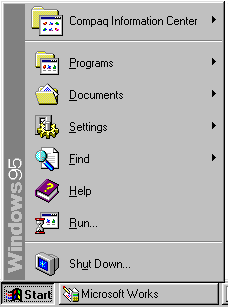
so icewyrm, you basically want it to look like this, except in different colours:
http://cgi.galion.lib.oh.us/instruction/windows/start_menu_95.png |
|||||||
| #104 02:45pm 15/01/09 |
|
|||||||
|
Spook
Posts: 23888
Location: Brisbane, Queensland
|
i like it exactly like that:
also, i hate any favourites/most used menus one of the first things i do on any install, is classic start button, strip off all the themes and then turn off "use personalised menus" and tick "always show full menus" in office/word |
|||||||
| #105 02:50pm 15/01/09 |
|
|||||||
|
Thundercracker
Posts: 1860
Location: Brisbane, Queensland
|
vista start menu owns
mind you i have a nice tool called Launchy for XP that does something similar (dont leave home without it) |
|||||||
| #106 03:10pm 15/01/09 |
|
|||||||
|
mooby
Posts: 4487
Location: Brisbane, Queensland
|
ja, vista menu good. search is the way forward. we run xp at work, so used to vista now :S
My housemate played Bioshock on his PC (which is an old single-core with DDR), and was able to run it brilliantly. that *is* cool. will have to have an install this weekend. Best part of it so far is that Media Centre has the vista oem rollup included. which means - wait for it... 7 DAY EPG WOOOO. yeah, wtf is the go with EPG in oz? reading some threads, you need a third party pluggin ? or now the stations are allowing it? |
|||||||
| #107 03:15pm 15/01/09 |
|
|||||||
|
Creepy
Posts: 1176
Location: USA
|
one of the first things i do on any install, is classic start button, strip off all the themes and then turn off "use personalised menus" and tick "always show full menus" in office/word So, Windows 95 with updated drivers then? :) |
|||||||
| #108 03:45pm 15/01/09 |
|
|||||||
|
DM
Posts: 806
Location: Gold Coast, Queensland
|
Windows 7 losses massive points for not being able to install the drivers needed to play DJ Max Trilogy, which is upsetting. The drivers install on their own when you plug in the accomanying USB thingy, but it says cant install. Worked on vista fine. Buu
|
|||||||
| #109 03:52pm 15/01/09 |
|
|||||||
|
Alt_F4
Posts: 681
Location: Brisbane, Queensland
|
You guys who hate the often used program list must use some dodgy apps.
|
|||||||
| #110 03:52pm 15/01/09 |
|
|||||||
|
icewyrm
Posts: 2098
Location: Brisbane, Queensland
|
You guys who hate the often used program list must use some dodgy apps. Actually, every app I use frequently is bound to a hotkey; only the programs I barely ever touch or that are too much effort to set up keybinds for need be in my start menu. I keep all of my documents, movies, games etc organised in particular folder structures, which I also have bound to hotkeys (I launch them in a windows explorer replacement). If I need to search for something, I use the hotkey to launch the folder I want to search, then use agent ransack to actually find what I need. (No need for disk intensive indexing services). I've been using a setup similar to this since windows 2000. Prior to windows 2000, I was using a pile of batchfiles to control all my old dos games and frequently used windows apps, because many of them needed particular environent settings (and I had enough DOS games and applications still installed that putting them all in menus was overly messy.) I had the paths set up so I could just pull up the run box and type in whatever game or app I wanted, and it would go. While I have tried using the various features enabled by default in XP and Vista (various changes to the UI with themes, inbuilt search capabilities, media libraries and so on), I generally find them poor alternatives to the 3rd party software and setup I have been using for years, offering worse features and generally slower performance. I have tried various other shells (such as blackbox for windows, windows blinds variations etc) but they sometimes have issues with other applications, or conflict with explorer in some way or another, so I got used to just using a minimalistic win2k shell theme (the same shell which I was using and deploying to systems at my old work). |
|||||||
| #111 04:46pm 15/01/09 |
|
|||||||
|
HerbalLizard
Posts: 3062
Location: Queenstown, New Zealand
|
For those running it on older hardware.
Installed on P4 3.6 660 8Gb of ram 7900GT Runs really really smooth. Got issues with my promise nas unit though, 120gb network transfer seems to be pretty speedy at tap under 45min from another machine last edited by HerbalLizard at 19:24:44 15/Jan/09 |
|||||||
| #112 07:24pm 15/01/09 |
|
|||||||
|
Strange Rash
Posts: 950
Location:
|
||||||||
| #113 08:28pm 15/01/09 |
|
|||||||
|
Midda
Posts: 3014
Location: Brisbane, Queensland
|
that *is* cool. will have to have an install this weekend. Yeah, but as s*** as his computer is, he has a fairly okay video card (8800GT). |
|||||||
| #114 08:35pm 15/01/09 |
|
|||||||
|
step
Posts: 1664
Location: Brisbane, Queensland
|
The drivers install on their own when you plug in the accomanying USB thingyTried running setup under vista compatibility mode? Pretty much anything that worked that didn't install anything else automatically (like daemon tools auto installing SPTD stuff) will work in Windows 7. |
|||||||
| #115 10:05pm 15/01/09 |
|
|||||||
|
DM
Posts: 808
Location: Gold Coast, Queensland
|
Don't work step, or at least i'm not sure on how to set something that automaticly installs once you plug it in, to use vista compatablity. You can't access what is on the little USB drive. You plug it in and 5 seconds later "cannot find drivers" or something like that. Vista worked fine but i'm guessing windows 7 is missing something. It's supposed to act as an online cd key, piracy protection and storage for your profile so you can take it anywhere. It sucks because it was my favorite game in a loooong time and I can't play it T.T
|
|||||||
| #116 11:55pm 15/01/09 |
|
|||||||
|
whoop
Posts: 13387
Location: Brisbane, Queensland
|
Anyone have an issue when you close a window by right clicking the taskbar icon and clicking "close window", once that window has closed the menu doesn't go away until you click somewhere else on the screen?
|
|||||||
| #117 12:20am 16/01/09 |
|
|||||||
|
simul
Posts: 365
Location: Brisbane, Queensland
|
I prefer this interface: XTG still the ultimate file browser. -r-a-s-h ftw |
|||||||
| #118 01:33am 16/01/09 |
|
|||||||
|
mooby
Posts: 4489
Location: Brisbane, Queensland
|
Yeah, but as s*** as his computer is, he has a fairly okay video card (8800GT). got a 9800, so keen to give it a go. |
|||||||
| #119 10:06am 16/01/09 |
|
|||||||
|
fpot
Posts: 15931
Location: Gold Coast, Queensland
|
Wow seeing that XTree brings back memories...
http://www.compu-seite.de/bilder/dos62/dosshell1.gif Also this. last edited by fpot at 10:11:08 16/Jan/09 |
|||||||
| #120 10:11am 16/01/09 |
|
|||||||
|
Pinky
Posts: 385
Location: Melbourne, Victoria
|
DOS Shell was the best. More user friendly than XTree Gold. I used XTree when I needed to do lots of file renaming and stuff. Ok, some screenies (installed under VirtualBox): http://img502.imageshack.us/img502/4441/01162009102315vc9.th.png http://img177.imageshack.us/img177/5874/01162009102516pt6.th.png http://img294.imageshack.us/img294/5028/01162009102854iq9.th.png Will upload some more later, have to leave momentarily... |
|||||||
| #121 10:31am 16/01/09 |
|
|||||||
|
HerbalLizard
Posts: 3063
Location: Queenstown, New Zealand
|
xtree gold now that brings back some memories
|
|||||||
| #122 09:29am 17/01/09 |
|
|||||||
|
Seven
Posts: 858
Location: Wollongong, New South Wales
|
I just installed the 64-bit verson of "7" inside VirtualBox (with many-a hiccup) but it seems to perform pretty well with only 1GB of allocated ram. Took a touch over 8GB of HDD space.
The actual installation was a breeze, very few hassles at all (once VirtualBox was configured correctly). Everything is very Vista-y though, seems like they'll stick with that theme for a while. Very stupid that Chrome didn't work off the bat, but hey, what do you expect with a Microsoft OS - damn politics. Next step I guess is to try it for real. http://img504.imageshack.us/img504/959/w7beta1lj7.th.jpg |
|||||||
| #123 11:34am 17/01/09 |
|
|||||||
|
Alt_F4
Posts: 683
Location: Brisbane, Queensland
|
I installed it on a spare HDD last night. Like everyone else said, it feels really fast and zippy compared to XP/Vista. The new taskbar is somewhat interesting, i think I like it.
Still, dunno if i would feel right paying $200+ for improvements that should have been in Vista anyway. |
|||||||
| #124 11:37am 17/01/09 |
|
|||||||
|
whoop
Posts: 13389
Location: Brisbane, Queensland
|
To those of you who say it's faster than XP, format your XP box and then compare. You're comparing a bare OS to one you've installed countless s*** into and probably a clusterf*** of horse porn in your temp internet folders. Wait until the w7 install has been used and abused as much as your xp install and then compare it.
....and what's with the name? Windows 7? Shouldn't it be like windows 9 or 10? I take windows 3.11 as the first number (there were windows v1.0 etc before it but seriously, who uses/used that?) so: windows 3.11 windows 4 (95) windows 5 (98) windows 6 (me) windows 7 (2k) windows 8 (xp) windows 9 (vista) windows 10 (this current abomination). I know I left out windows NT and really I probably should have left out 2k in a sense it wasn't really designed for home users but many still used it at home so meh. So where the hell did they get this windows 7 thing from? Why are the numbers all over the place as well? I mean windows 3.11, then windows 2000 now back to windows 7? Why not windows 7000 or just call it something fancy like Windows FAE (f***ing awesome edition :p) |
|||||||
| #125 01:52pm 17/01/09 |
|
|||||||
|
icewyrm
Posts: 2099
Location: Brisbane, Queensland
|
Meh, it's more to do with the NT kernel version. Prior versions up to NT4 (4.0), then 2k (NT 5.0) XP (5.1) Vista (6.0) and now windows 7 (6.1). They just called it windows 7 because 0.1 of a version doesn't sound very impressive :p
|
|||||||
| #126 02:40pm 17/01/09 |
|
|||||||
|
Hogfather
Posts: 2287
Location: Cairns, Queensland
|
drugs are bad whoop.
|
|||||||
| #127 03:19pm 17/01/09 |
|
|||||||
|
infi
Posts: 10882
Location: Brisbane, Queensland
|
you could hardly call "ME" an OS.
|
|||||||
| #128 04:05pm 17/01/09 |
|
|||||||
|
kos
Posts: 976
Location: Melbourne, Victoria
|
||||||||
| #129 05:00pm 17/01/09 |
|
|||||||
|
rubba-chikin
Posts: 6249
Location: Brisbane, Queensland
|
I just installed the 32bit version on a spare HDD.
No problems with the install, beta ATI drivers work fine, all other devices the vista drivers worked just fine. I wouldn't say its easily faster than my vista64 install, but its a brand new fresh install. Its negligible at best for me. I fired up TF2 and that ran just as well if not slightly better. First things in - Disabled the firewall and defender and turned UAC all the way down to nothing. Hate the superbar with a passion... haxed quicklaunch back in there Snipping tool is excellent from a support view A+ idea there Stickynotes are also pretty cool, I'd probably start using them instead of txt files Overall I can't see a whole lot of difference. Theres a lot more nube friendly menu/right click options though. |
|||||||
| #130 09:01pm 17/01/09 |
|
|||||||
|
whoop
Posts: 13393
Location: Brisbane, Queensland
|
OOOOOOOOOOOOOOOOOOOOOOOOOOHHHHH
quite logical explanation for windows numbers I should have seen coming I guess I've been out of the computer loop for so long I've started thinking like the average "mom and pop" user, kill me now :( It just seems strange to me after having moved away from windows [number] to windows [catchphrase] that they'd go back to numbers. |
|||||||
| #131 11:25pm 17/01/09 |
|
|||||||
|
HerbalLizard
Posts: 3065
Location: Queenstown, New Zealand
|
Using minefield for a browser, under 64bit verison seems pretty about the same as firefox on xp32. What I really want is java se to work for my nas. Might have a bash at using either a direct path or symbolic link may work dunno yet.
|
|||||||
| #132 09:10am 18/01/09 |
|
|||||||
|
3dee
Posts: 2954
Location: Brisbane, Queensland
|
Windows 2000 was the best.
|
|||||||
| #133 09:52am 18/01/09 |
|
|||||||
|
rubba-chikin
Posts: 6250
Location: Brisbane, Queensland
|
On browsers I found chrome to be super lightning fast on win7
|
|||||||
| #134 01:10pm 18/01/09 |
|
|||||||
|
mission
Posts: 4557
Location: Brisbane, Queensland
|
I find it to be super fast under Vista.
I love Chrome. Except I haven't quiet worked out how the downloads work, but then again, I haven't really looked into it. |
|||||||
| #135 01:19pm 18/01/09 |
|
|||||||
|
Fn
Posts: 5357
Location: Brisbane, Queensland
|
It runs surprisingly well on my old hardware. Its super quick so far, really smooth and loving it.
Even after a few days of installing a few things. Once I finally got drivers to finally work with my nForce2 Ethernet and Audio. Had trouble, compatibility mode wasn't helping unfortunately but found some older WHQL driver remixes which did the trick. Barton 2500@3200 <-Default MB CPU clock. Abit NF7-S V2 2g ddr400 Dual Channel<----Hardcore 6800GT AGP<------- hehe Booting Win7 via Sata HDD So yes its dam old gear well over due for new machine or at least an 8800GT! :) Vista ran like arse on this hardware during beta, final build and updates, so great to see improvements in performance which can be overlooked from time to time. |
|||||||
| #136 08:52pm 19/01/09 |
|
|||||||
|
natslovR
Posts: 6053
Location: Sydney, New South Wales
|
installed win7 and it is going good so far.
I am using a GA-EP45-DS3P and had SM Bus Controller appearing as not found in Other Devices. I just downloaded the chipset for my motherboard and said update driver software and pointed it at the file that this uncompressed to: http://asia.giga-byte.com/FileList/Driver/motherboard_driver_chipset_intel_x4x5_sereis.exe I am running Chrome on Win7 64bit and it wouldn't work. I added the following startup parameters to fix it: --no-sandbox |
|||||||
| #137 11:12pm 25/01/09 |
|
|||||||
|
Fn
Posts: 5362
Location: Brisbane, Queensland
|
I had audio distorting trouble with my onboard nforce2 audio. (Abit NF7-s V2, same hardware as Asus a7nx-deluxe)
Latest drivers and windows update drivers no good. Seems to be common according to google with no fixes listed. Used these older drivers however fixed the issue for me. I've been running winamp and L4D for an hour with no sound issues so far. |
|||||||
| #138 02:17am 26/01/09 |
|
|||||||
|
parabol
Posts: 5132
Location: Brisbane, Queensland
|
||||||||
| #139 02:34am 26/01/09 |
|
|||||||
|
Fn
Posts: 5363
Location: Brisbane, Queensland
|
I wouldn't call it innovation just catching up :)
|
|||||||
| #140 02:48am 26/01/09 |
|
|||||||
|
Crakaveli
Posts: 3068
Location: USA
|
Does windows 7 have aero?
|
|||||||
| #141 03:02am 26/01/09 |
|
|||||||
|
whoop
Posts: 13446
Location: Brisbane, Queensland
|
nestle aero is the only aero you ever need.
|
|||||||
| #142 04:10am 26/01/09 |
|
|||||||
|
natslovR
Posts: 6055
Location: Sydney, New South Wales
|
Quake live beta doesn't work for me under IE
I lost my iTunes library - I thought backing up appdata\iTunes would be enough but apparently the jump from xp32 to win7-64 was too much, or I shouldve looked into it and done re manual backup/export |
|||||||
| #143 09:59am 26/01/09 |
|
|||||||
|
MrHardware
Posts: 4257
Location: Brisbane, Queensland
|
Does windows 7 have aero?Yes. the option won't show up if you don't have hardware that supports it however. |
|||||||
| #144 10:12am 26/01/09 |
|
|||||||
|
BoDGie
Posts: 360
Location: Brisbane, Queensland
|
Snipping tool is excellent from a support view A+ idea there Vista has the Snipping tool to... http://windowshelp.microsoft.com/Windows/en-us/help/1337cdba-52a2-4704-ad4d-2d7bace605b41033.mspx |
|||||||
| #145 10:21am 26/01/09 |
|
|||||||
|
MaGGiC
Posts: 32
Location: Brisbane, Queensland
|
Hey has anyone tried the latest windows 7 build? |
|||||||
| #146 01:37am 29/04/09 |
|
|||||||
|
Creepy
Posts: 1373
Location: USA
|
The public RC build is released next week (May 5th).
I'll wait for the official bits from MS themselves... |
|||||||
| #147 03:26am 29/04/09 |
|
|||||||
|
Mass
Posts: 557
Location: Brisbane, Queensland
|
They are available on Thursday for technet users!
I've already downloaded both 32bit and 64bit from an "alternative" source. The release candidates run through to June 2010 before time bomb. Given the feedback I've seen from releases 7057 and 7077 I will most likely upgrade my HTPC to use Windows 7 RC1 until the RTM is available early next year. I may even upgrade my gaming rig. If you are running a HTPC there are some major improvements for Media Centre, even works with my 4 digital tuners without a registry hack. All sorts of nifty improvements like adding channel logos to Guide, greater codec support, enhanced library functions. I ran 7057 for some testing and it was very solid and far out performs Vista. |
|||||||
| #148 08:04am 29/04/09 |
|
|||||||
|
HerbalLizard
Posts: 3097
Location: Queenstown, New Zealand
|
I am waiting on a new rc hopefully get one in my maps subby but I doubt it
|
|||||||
| #149 08:17am 29/04/09 |
|
|||||||
|
boba
Cainer
Posts: 3358
Location: Brisbane, Queensland
|
i've been running the rc for a few days on my main pc, runs sweet and I have zero problems with it and much faster than vista
|
|||||||
| #150 08:35am 29/04/09 |
|
|||||||
|
casa
Thimes
Posts: 3267
Location: Brisbane, Queensland
|
^ im with stupid ^ been running 7068 since it came out and its been smoooooooooth like your mums twat |
|||||||
| #151 10:06am 29/04/09 |
|
|||||||
|
Tremble
Posts: 23
Location: Brisbane, Queensland
|
been running 7068 since it came out and its been smoooooooooth like your mums twat ...untill it gets a virus. |
|||||||
| #152 02:25pm 29/04/09 |
|
|||||||
|
boba
Cainer
Posts: 3360
Location: Brisbane, Queensland
|
been running 7068 since it came out and its been smoooooooooth like your mums twatnubcake, rc is 7100 not 7068 |
|||||||
| #153 03:29pm 29/04/09 |
|
|||||||
|
E.T.
Posts: 1859
Location: Queensland
|
Hang on Boba, Casa's just checking his version number.....
http://www.users.bigpond.net.au/et/images/casa-head-up-arse.jpg |
|||||||
| #154 03:45pm 29/04/09 |
|
|||||||
|
Midda
Posts: 3508
Location: Brisbane, Queensland
|
...untill it gets a virus. What? |
|||||||
| #155 11:01pm 29/04/09 |
|
|||||||
|
system
|
--
|
|||||||
| #155 |
|
|||||||
|
| ||||||||