|
 |
|
 |
|
| Author |
|
|||||||
|
Some Fat Bastard
Posts: 487
Location: Brisbane, Queensland
|
Is there a limit or problem trying to have two VPNs opened at the same time. I'm trying on my laptop with Windows XP establish two VPNs at the same time but when I connect to the 2nd VPN (China) I can't see out to the net nor anything from the 1st VPN (USA) only traffic from the second VPN (China).
Any answers? |
|||||||
| #0 06:58pm 18/02/09 |
|
|||||||
|
system
|
--
|
|||||||
| #0 |
|
|||||||
|
pARODY
Posts: 245
Location: Brisbane, Queensland
|
You can have multiple VPN's on a host but they can possibly conflict with the IP given to the loopback address of the VPN and the routing designed for that VPN.
|
|||||||
| #1 07:01pm 18/02/09 |
|
|||||||
|
Skitza
Posts: 8636
Location: Brisbane, Queensland
|
maybe split tunneling is not allowed on one of them? Windows VPN or Cisco or what ?
|
|||||||
| #2 07:02pm 18/02/09 |
|
|||||||
|
TicMan
Posts: 4198
Location: Melbourne, Victoria
|
In answer to your question, you can run 2 VPNs at the same time provided the subnets don't over lap.
However, to answer this problem it could be your router stopping you from having 2 VPNs. There's a common problem with GRE that prevents 2 VPNs from being established. |
|||||||
| #3 07:09pm 18/02/09 |
|
|||||||
|
Some Fat Bastard
Posts: 488
Location: Brisbane, Queensland
|
They are both windows VPNs. I have a netgear router which supposely allows VPN configuration. Would it be better to try and set them up there?
How do I set up split tunnelling and verify routing addresses. |
|||||||
| #4 07:09pm 18/02/09 |
|
|||||||
|
Some Fat Bastard
Posts: 489
Location: Brisbane, Queensland
|
There's a common problem with GRE that prevents 2 VPNs from being established.It's a netgear dg834 if that's any help. When in Australia I work from home and that is my router I'm using. |
|||||||
| #5 07:11pm 18/02/09 |
|
|||||||
|
Superform
Posts: 5294
Location: Netherlands
|
needs more info on how you have it set up including ip's etc
you should be able to do it though.. run win server in a virtual machine xp only allows 1 vpn connection i believe |
|||||||
| #6 07:11pm 18/02/09 |
|
|||||||
|
TicMan
Posts: 4199
Location: Melbourne, Victoria
|
Chances are any router that isn't a Cisco built bajillion dollar job won't support multiple PPTP VPNs.
|
|||||||
| #7 07:12pm 18/02/09 |
|
|||||||
|
Spook
Posts: 24230
Location: Brisbane, Queensland
|
especially if its a s*** netgear cheapy
|
|||||||
| #8 07:17pm 18/02/09 |
|
|||||||
|
infi
Posts: 11240
Location: Brisbane, Queensland
|
they open up dual VPNs on 24 all the time.
|
|||||||
| #9 07:19pm 18/02/09 |
|
|||||||
|
TiT
Posts: 1980
Location: Brisbane, Queensland
|
make sure you disable this under properites
Networking Internet Protocol Advance http://img153.imageshack.us/img153/9039/vpnnn9.th.jpg last edited by TiT at 19:24:34 18/Feb/09 |
|||||||
| #10 07:24pm 18/02/09 |
|
|||||||
|
parabol
Posts: 5201
Location: Brisbane, Queensland
|
they open up dual VPNs on 24 all the time. Yep, they need Chloe and the purple-shirted Chloe-clone to open up 'sockets' ALL THE TIME. |
|||||||
| #11 07:26pm 18/02/09 |
|
|||||||
|
Jim
Posts: 9243
Location: Brisbane, Queensland
|
sounds a bit like your china config sets a default route so as soon as you connect it up you're trying to send everything up that vpn
you shouldn't have any issue running up multiple windows vpn clients, I've done it before with XP - specifically via pptp. you certainly won't have any issue with multiple vpn's using openvpn, I'm doing it right now |
|||||||
| #12 07:30pm 18/02/09 |
|
|||||||
|
Jim
Posts: 9244
Location: Brisbane, Queensland
|
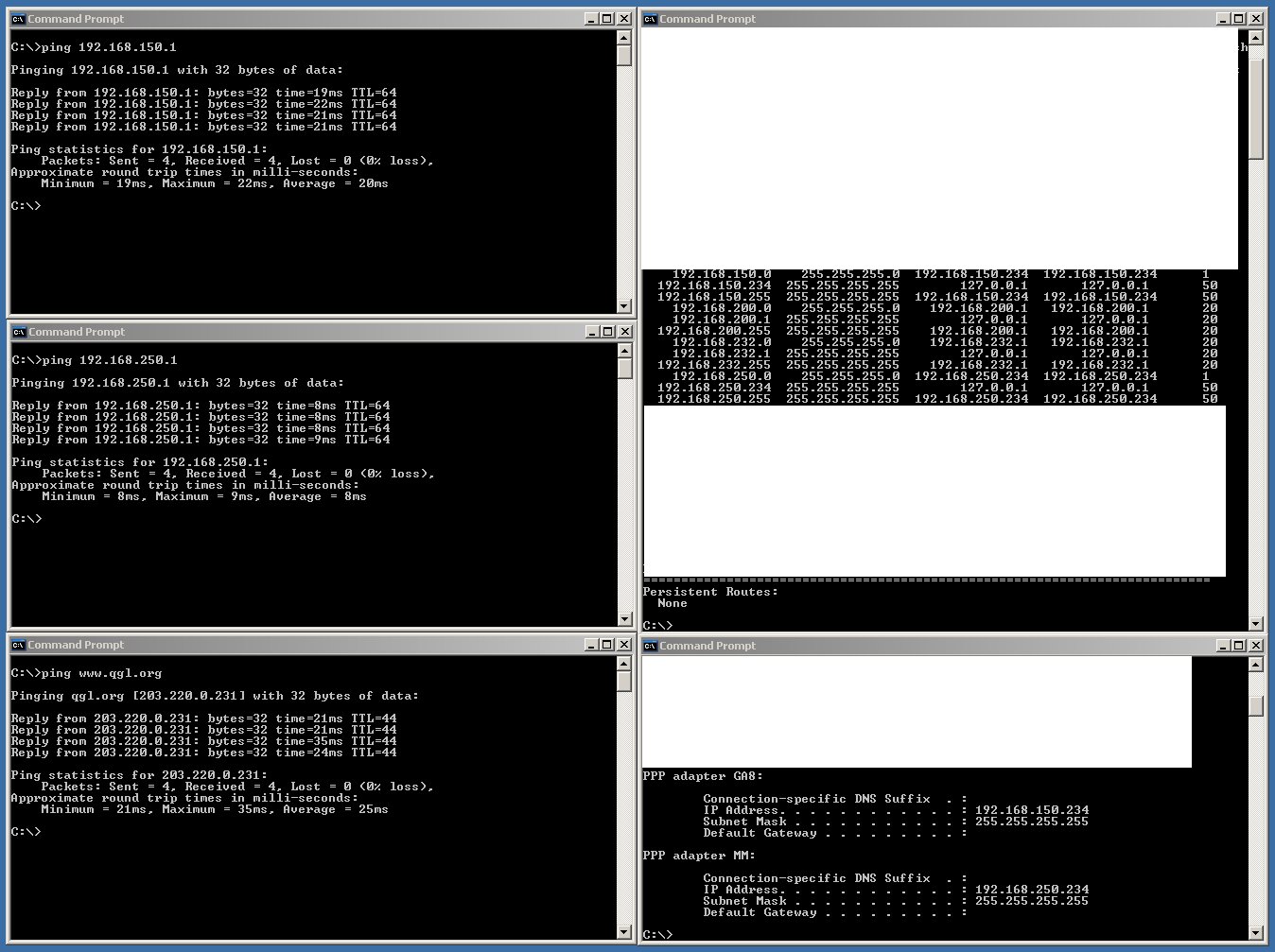
yeh just tested this and it works fine
fired up pptpd on a server in brisbane and a server in sydney, made two new vpn connections using the windows client, connected them both up and away they go http://jason.qgl.org/images/ms-pptp.jpg |
|||||||
| #13 08:16pm 18/02/09 |
|
|||||||
|
Some Fat Bastard
Posts: 490
Location: Brisbane, Queensland
|
Jim and everyone else,
Thanks, much appreciated. Shall follow through with your suggestions and see how I go. Cheers |
|||||||
| #14 08:36pm 18/02/09 |
|
|||||||
|
BOOST
Posts: 168
Location: Brisbane, Queensland
|
What would you do if you had a million dollars?
|
|||||||
| #15 08:41pm 18/02/09 |
|
|||||||
|
tequila
Posts: 1231
Location: Sydney, New South Wales
|
it will also establish the second VPN using the default route of the first vpn, which may not work depending what software you're using
vmware imo - at telstra when working from home we're forced to use some crappy citrix & nortel vpn client which is totally aids, can't do much else on the pc while connected so its easier to just fire up a vm |
|||||||
| #16 09:02pm 18/02/09 |
|
|||||||
|
Jim
Posts: 9245
Location: Brisbane, Queensland
|
it will also establish the second VPN using the default route of the first vpn, which may not work depending what software you're using I included the output of route print in my screenie to show that's not the case |
|||||||
| #17 09:06pm 18/02/09 |
|
|||||||
|
tequila
Posts: 1232
Location: Sydney, New South Wales
|
yeah but his client might not be that smart; windows client will always know which address is the real address
3rd party software might just try and establish connection to his end point - which would just be treated as tcp traffic on the first vpn @op are you using windows vpn or something else? |
|||||||
| #18 09:12pm 18/02/09 |
|
|||||||
|
Fn
Posts: 5381
Location: Brisbane, Queensland
|
omgread
|
|||||||
| #19 09:53pm 18/02/09 |
|
|||||||
|
TicMan
Posts: 4200
Location: Melbourne, Victoria
|
it will also establish the second VPN using the default route of the first vpn, which may not work depending what software you're using Only if his default route changes. Also, the second VPN is being established and works, its the first that stops working which points to the GRE problem. The router sounds like it only supports 1 PPTP pass through. |
|||||||
| #20 10:10pm 18/02/09 |
|
|||||||
|
Jim
Posts: 9247
Location: Brisbane, Queensland
|
possibly, but that shouldn't stop his normal interweb traffic from working as well - but a new default route pointing up the china vpn probably would
|
|||||||
| #21 11:09pm 18/02/09 |
|
|||||||
|
koopz
Posts: 7488
Location: Brisbane, Queensland
|
How do I set up split tunnelling and verify routing addresses. SFB.. how the hell did you get your job without already knowing the answer to that question. I know you guys don't know how to fix a bloody computer anymore, but seriously dude... WTF! |
|||||||
| #22 11:39pm 18/02/09 |
|
|||||||
|
Strange Rash
Posts: 979
Location:
|
if all else fails... virtual servers!
|
|||||||
| #23 11:41pm 18/02/09 |
|
|||||||
|
Some Fat Bastard
Posts: 491
Location: Brisbane, Queensland
|
Mate, VPNs are not my problem. Even though I have set up all the VPNs I use for each client on my laptop I have never needed two connected at the same time. So I haven't encountered the problem before and thus never needed to know how to or what to configure for two. I am a user of VPNs not an Network Architect or Network Tech. My field of expertise is Business Analysis, Project Management and Software Engineering.
I have better things to do with my time than worry about VPNs and the multiplicity of configurations and inplementations. That's for detail people. I have things like $3.3million implementation projects to worry about than learn everything about setting properties to a piece of VPN software. Now if you think that's hard try doing that whilst listening to and trying to speak bloody chinglish if you're lucky to find someone who even knows that. The only reason I need two for the first time ever is becuase of the security overload by the Chinese. I cannot work on their system remotely from anywhere in the world without first having a VPN to allow them to desktop share my desktop through our corporate web conferencing application which allows them to watch what the f..k I do remotely. Yes, I have someone in China sitting at a screen watching my Desktop as I go about travelling between SAP and our Asset Performance Management System and identifying the gaps requiring customisation in Business Processes, Work Flow Managemement, Work Cycles and Work Practices of China's State Petroleum and Chemical Company, Sinopec, owner of roughly 29,000 service stations in China, their largest Oil refinery and Checmical company and the 16th largest company in the world. All to manage an average 100,000 asset pieces per plant and refinery in the 100's Sinopec own, The goal being increased productivity, effeciency and output at a lower operating cost for each plant and refinery. Yeah right, I need to understand VPNs to do my pissy job. last edited by Some Fat Bastard at 01:35:09 19/Feb/09 |
|||||||
| #24 01:35am 19/02/09 |
|
|||||||
|
Jim
Posts: 9250
Location: Brisbane, Queensland
|
oh boy there's gonna be a pm for you now
|
|||||||
| #25 01:34am 19/02/09 |
|
|||||||
|
Some Fat Bastard
Posts: 492
Location: Brisbane, Queensland
|
lol, by the way thanks heaps for the help Jim.
|
|||||||
| #26 01:44am 19/02/09 |
|
|||||||
|
Jim
Posts: 9251
Location: Brisbane, Queensland
|
no wukkaz
|
|||||||
| #27 08:28am 19/02/09 |
|
|||||||
|
Spook
Posts: 24234
Location: Brisbane, Queensland
|
Yes, I have someone in China sitting at a screen watching my Desktop u should arrange your desktop icons into amusing shapes, like in this http://www.thewebsiteisdown.com/ |
|||||||
| #28 09:56am 19/02/09 |
|
|||||||
|
ara
Posts: 2455
Location: Sydney, New South Wales
|
share the VPN via Windows ICS and have another machine connect via your existing VPN. Then when they are watching your PC do nothing you can be hacksawing them! |
|||||||
| #29 10:40am 19/02/09 |
|
|||||||
|
blahnana
Posts: 350
Location: Brisbane, Queensland
|
Seriously ara, if you come in here talking about hacksawing I wonder how you can even do your job.
|
|||||||
| #30 10:43am 19/02/09 |
|
|||||||
|
VRBones
Posts: 857
Location: Sunshine Coast, Queensland
|
Dammit jim, you accidentally blanked out the interesting bit on your screeny.
|
|||||||
| #31 10:48am 19/02/09 |
|
|||||||
|
Jim
Posts: 9252
Location: Brisbane, Queensland
|
:D
|
|||||||
| #32 11:10am 19/02/09 |
|
|||||||
|
ara
Posts: 2456
Location: Sydney, New South Wales
|
what job? |
|||||||
| #33 11:16am 19/02/09 |
|
|||||||
|
system
|
--
|
|||||||
| #33 |
|
|||||||
|
| ||||||||